


Every form on your website is a conversion decision. The moment someone lands on a form, whether it is a contact form, a demo request, or a registration page, they are deciding whether the effort is worth it. And one of the most common questions marketers and developers ask is this: should the form be one page or broken into multiple steps?
The honest answer is that multi-step forms usually work better for longer or more complex inputs, while single-page forms perform better when speed and simplicity are the priority. But here is the thing most people miss: choosing the right format is only half the equation. Most conversion problems do not come from picking the wrong layout.
They come from poor structure, bad field ordering, and weak data handling on the backend. This is exactly the gap that tools like Contact Form to API address, ensuring that every submission is instantly sent to your CRM or backend system the moment a user clicks submit, without delays, manual handling, or lost leads. Improving conversions is not just about how the form looks, but how reliably your system responds once it is completed.
This guide will walk you through when each format works, where they fail, and how to choose based on real user behavior rather than guesswork. By the end, you will have a clear framework to make the right call for your specific situation.
The Real Problem With Long Single-Page Forms
Imagine visiting a website to request a demo. You click the button, and a form appears with 12 fields staring back at you. Name, email, phone, company, company size, industry, role, use case, budget, preferred contact time, country, and a message box.
Before you have typed a single character, part of your brain is already calculating whether this is worth the effort.
That is cognitive overload, and it kills conversions before the user even starts.
Long single-page forms create three specific problems.
- Seeing everything at once makes the task feel bigger than it actually is. Even if filling out the form takes three minutes, the visual weight of 12 fields suggests it will take much longer.
- On mobile devices, long forms require constant scrolling. Users lose their place, miss fields, and get frustrated. Completion rates drop sharply.
- Length perception matters more than actual length. A form with 8 well-spaced fields can feel longer than a 12-field form broken into three clean steps.
None of this means single-page forms are bad. It means there is a clear ceiling to how much you can ask on one page before users start leaving. Multi-step forms were built specifically to address this problem.
But here is something that gets overlooked constantly: even when users push through a long form and hit submit, the conversion is not guaranteed. If that submission sits inside WordPress with no real-time routing, the lead goes cold.
The data stays in a database table instead of flowing into your CRM.
The follow-up automation never fires.
The momentum the user built up by completing the form disappears.
When Multi-Step Forms Convert Better
Multi-step forms are not just a visual trick. Each scenario below shows a real situation where breaking a form into steps produces measurably better results.
- When the form has six or more fields. At this length, a single page starts to feel like a questionnaire. Breaking it into steps creates the feeling of a short conversation rather than a bureaucratic task. Users see fewer fields at a time, and completion rates go up because the cognitive load is distributed.
- When most of your users are on mobile. Smaller screens need smaller chunks. A multi-step form presents one logical group of fields per screen, which matches how mobile users naturally scroll and interact. A long single-page form on mobile is a scrolling nightmare that most users abandon.
- When you are qualifying leads. Start with easy questions like name and email, then move to harder ones like company size or budget. This is commitment psychology at work. Once someone has already answered two or three questions, they are far more likely to finish than if you had asked the difficult questions first. Getting someone started is more than half the battle.
- When the content naturally groups into phases. Applications, event registrations, and multi-part surveys all have logical sections. Personal information belongs together. Professional details belong in their own group. Preferences come last. A multi-step form mirrors that natural grouping, which makes the experience feel organized rather than overwhelming.
- When you need conditional logic. If the answer to one question changes what fields appear next, multi-step forms handle this cleanly. A user answers yes to “Are you a business?” and the next step shows company-specific fields. On a single-page form, fields appearing and disappearing in real time can feel disjointed and confusing. Multi-step forms make conditional paths feel intentional.
When Single-Page Forms Convert Better
Multi-step forms are not always the answer. There are situations where adding steps creates friction instead of removing it.
- When the form is short. Two to five fields is the sweet spot for a single-page form. Contact forms, newsletter signups, and basic lead generation forms have no business being split into multiple steps. Adding steps to a three-field form creates unnecessary clicks and makes a simple action feel more complicated than it is.
- When users are already high-intent. Someone who just read your entire pricing page and clicked “Get a Quote” is not browsing. They are ready to act. A single-page form gets them to the outcome faster. Adding steps between them and the submit button is a reason to slow down and reconsider.
- When users might want to navigate freely. Some forms are non-linear by nature. Users may want to jump back to an earlier section, adjust an answer, or review the whole thing before submitting. On a single-page form, this is natural. On a multi-step form, navigating backwards is awkward and sometimes broken.
UX Best Practices That Improve Conversions in 2026
Picking the right format gets you most of the way there. But how you build and connect the form determines whether it actually performs.
-
Multi-step forms
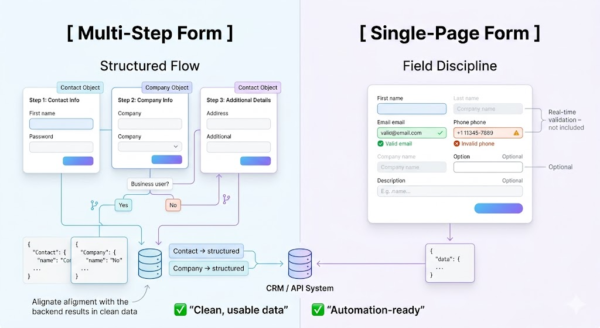
For multi-step forms, the biggest mistake teams make is treating each step as a design problem instead of a data problem. Every step boundary should align with how your backend or CRM expects structured data. If your CRM needs company information as a separate object from contact details, design your form steps around that. The user experience improves when the steps feel logical, and the data quality improves when those steps match your system’s structure.
Conditional logic deserves special attention. Hidden fields that do not appear based on user paths need to be handled carefully. If a user skips a conditional branch, your API payload should still be consistent. Missing keys or unexpected nulls can break automations downstream. Build your conditional logic so the payload structure stays predictable regardless of which path the user takes.
-
Single-page forms
For single-page forms, the biggest opportunity is field discipline. Not every field your CRM can accept needs to be on the form. Only ask for what you will actually use. Extra fields create noise in your analytics, clutter your CRM records, and give users more reasons to hesitate. Clean forms collect cleaner data.
Real-time validation matters for more than user experience. It ensures only well-formatted, usable data reaches your API. A phone number field that accepts anything means your CRM receives garbage. Validation before submission means your data pipeline receives structured inputs it can act on.
Optional fields deserve explicit treatment. If a field is optional, mark it clearly. Inconsistent optional data creates broken automation workflows when your system expects a value and receives nothing.
At this point, the form is not just a UI component. It is the front end of a data pipeline. And how that pipeline is designed determines whether your conversions turn into usable outcomes.
How to Connect Form Submissions to Your CRM or Backend
The approach below uses Contact Form to API as the example, but the principles apply to any direct form-to-API setup. Contact Form to API is the bridge between form submissions and the tools your business actually uses. It does not matter whether you are using a single-page form or the final step of a multi-step form. The moment a user clicks submit, the data travels directly to your API endpoint in real time.
Here is what that looks like in practice. The plugin connects directly to Contact Form 7 inside WordPress. You enter your API endpoint, choose POST or GET, configure authentication (Basic Auth, Bearer Token, OAuth 2.0, or JWT), and map your form fields to the API fields your platform expects. That is the entire setup. No Zapier. No middleware. No monthly recurring fees.
The field mapping feature is particularly valuable because it gives you control over the payload. You choose exactly which fields get sent and what they are named at the destination. Your CRM receives clean, correctly structured data from the first submission. No filtering required on the backend.
The plugin also supports sending to multiple endpoints simultaneously. If you need one submission to go to HubSpot, Airtable, and an internal webhook at the same time, that is handled in a single configuration.
Over 150 platforms are supported, including Salesforce, Zoho, Mailchimp, ActiveCampaign, Pipedrive, Odoo, Google Sheets, Slack, Twilio, and many more.
Because the plugin does not store form data inside WordPress by default, you get a cleaner setup with better privacy. Submissions go directly to where they need to be, not into a database table waiting for someone to check it.
Automation starts instantly. The moment your CRM receives the data, any follow-up sequences you have configured fire immediately. The lead does not go cold. The window stays open.
Quick Comparison: Which Form Type Should You Use?
| Single-Page Form | Multi-Step Form | |
| Best for | 2 to 5 fields, quick actions | 6 or more fields, complex processes |
| Mobile experience | Good for short forms | Better for longer forms |
| Completion rate | High for short forms | Higher for long forms |
| User effort | Fewer clicks | More clicks, but less overwhelming |
| Ideal use case | Contact, newsletter, basic lead gen | Registrations, bookings, surveys, applications |
| Conditional logic | Works but can feel disjointed | Handles it cleanly |
| Lead qualification suitability | Best for basic lead capture with minimal qualification | Ideal for progressive qualification and filtering high-intent leads |
Conclusion
Form conversion is no longer just about getting users to click submit. It is about what happens immediately after.
Choosing between a single-page form and a multi-step form helps improve completion rates, but it does not guarantee outcomes. Delayed, poorly routed, or disconnected submissions from your systems can cause even high-intent conversions to lose momentum before your team can act on them.
This is where treating your form as part of a real-time data workflow becomes critical. When submissions move instantly into your CRM or backend systems, structured correctly and ready for action, your form stops being a passive collection point and becomes an active part of your conversion engine.
If your current setup relies on manual exports or email notifications, the next step is to identify where delays are happening, whether in routing, validation, or follow-up. Once that gap is clear, improving the form structure and ensuring reliable data delivery go hand in hand.
With Contact Form to Any API, you can implement this shift without changing how your forms are built. Whether you are using a single-page form or a multi-step flow, submissions are sent directly to your CRM or tools in real time, with full control over field mapping and no unnecessary storage or middleware.


