


Introduction: Why Contact Form Automation Is No Longer Optional
Here is something surprising we have noticed: Most WordPress websites still treat contact forms as inbox fillers. A visitor submits a form, an email lands somewhere, and the process ends there. From a system perspective, nothing else triggers.
This approach works when submissions are occasional. It fails the moment volume increases. At ten leads a day, delays are manageable. At fifty, inboxes become bottlenecks. At scale, intent decays before follow-ups even begin.
That is where CF7 automation becomes a process decision, not a plugin decision.
In layperson terms, automation means submissions move instantly to the correct destination without manual handling — No copy-paste. No waiting. No guessing whether someone saw the message.
Most blogs recommend which tool to install. In contrast, this guide focuses on what actually happens to your data after submission and how to automate that flow without writing code.
The goal is straightforward: route form data immediately, reduce handling, and let systems do the work.
What “No-Code WordPress Form Automation” Actually Means
No-code WordPress form automation does not mean removing logic. It means configuring how submission data moves after the form is submitted, without writing custom scripts.
With no-code WordPress form automation, the form itself remains unchanged. The automation begins after submission, not within the form builder. Once a visitor clicks submit, the data enters a predefined workflow that routes it to the correct system without hands-on processing.
The form collects data. Automation decides what happens next.
The structure is simple:
Trigger → Action → Destination
A form submission acts as the trigger. The action might be creating a lead, tagging a contact, or logging an entry. The destination is where that data is sent next, such as a CRM, a spreadsheet, or an internal system.
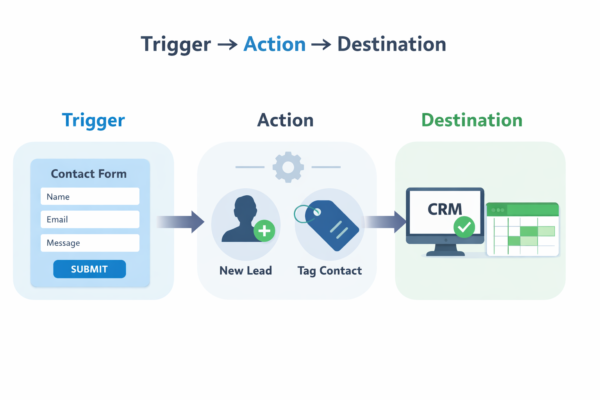
For example, a contact form submission (trigger) can create a lead and apply tags (action), then send the data to a CRM or spreadsheet (destination).
The primary difference is not only speed, but also behavior. Email notifications only inform a team that something has ensued. System integrations cause something to fire by default.
That shift makes automation reliable rather than reactive.
Method 1: Send Contact Form 7 Data Directly to a CRM or API (Real-Time)
This is the most direct and scalable approach to implement CF7 automation.
When a visitor submits a Contact Form 7 form, the data is sent in real-time to an API endpoint rather than landing in an inbox. That endpoint can belong to a CRM or any internal system that oversees lead handling.
Ownership is explicit. Handoffs are eliminated. Processing starts immediately. This method works best when the CRM or internal system is the single source of truth.
Each form field is transmitted as structured data. Names, emails, selections, and context arrive as defined attributes, not as a text message. The receiving system processes the submission immediately, making the CRM the source of truth.
Academic research shows that structured form input can be propagated across systems to reduce redundancy and improve consistency.
This approach works best for:
- Capturing sales leads that require immediate follow-up.
- Handling inbound inquiries tied to pipelines or accounts.
- Processing internal request forms where ownership is obvious.
Configuration setup stays minimal:
✔️Endpoint URL where submissions are sent
✔️Authentication to confirm the receiving system
✔️Field mapping to align form inputs with data attributes
✔️Test request to verify delivery and response
The primary advantage is flow. Data routes directly from form to system, systematically and without human intervention. It automates the transfer, not just the notification.
Method 2: Sync Contact Form Entries to Google Sheets in Real Time
For many teams, Google Sheets is usually the foremost automation destination because it is familiar, accessible, and easy to share. When Contact Form 7 entries sync promptly, every submission displays instantly as a new row, without exports or inbox inspection.
This approach favors visibility over control. It is ideal for monitoring submissions, not managing lead lifecycles.
It works smoothly for operations teams and founders who need shared visibility. Everyone views the same data simultaneously, keeping reviews and follow-ups aligned.
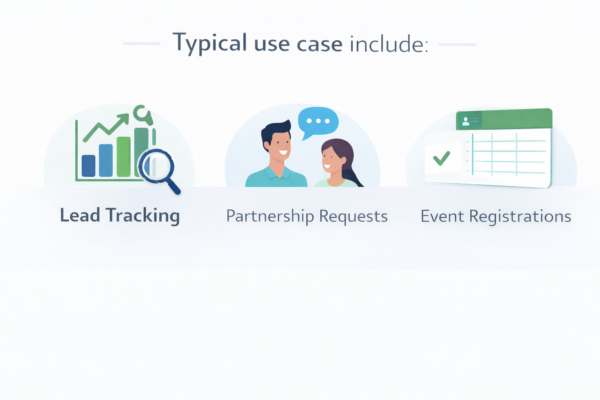
Google Sheets are practical for a destination, not a system of record. They provide transparency and quick access, but they do not enforce ownership, prevent duplicates, or manage lifecycle stages.
Hence, treat Google Sheets as a visibility layer that complements automation. Let CRMs and marketing systems handle structured workflows, while Google Sheets keep teams informed and coordinated.
Method 3: Route Leads to Marketing and Sales Tools Using Automation Platforms
Automation platforms act as connectors between your form and multiple tools. The process is straightforward: a form is submitted, the platform receives the data, and several actions are executed sequentially.
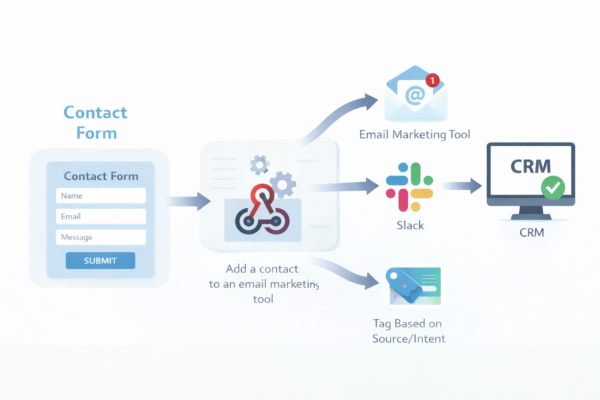
This approach is popular because it is quick to set up and works across broader ecosystems. Teams can experiment, iterate, and connect tools without writing code. For early-stage workflows, that flexibility is beneficial.
There are trade-offs. These platforms sit between your form and your systems, which introduces dependency. As workflows evolve, limits surface around task volume, execution speed, and monthly costs.
Data also passes through an external layer that does not own the lifecycle.
Automation platforms are excellent routers. Long-term control still depends on where the data ultimately lives.
Method 4: Trigger Custom Workflows Using Webhooks
When routing through platforms isn’t enough, some teams push data directly to their own endpoints.
Webhooks sound technical, but the idea is straightforward.
A webhook is an automated push of form data to a specific URL the moment a submission takes place. There is no polling, no waiting, and no follow-up request. The form submits, and the destination promptly receives the data.
All this makes webhooks valuable when you need to feed data into systems that do not fit neatly into CRMs or marketing platforms. Internal tools, custom dashboards, and lightweight services often rely on webhooks because they expect incoming data rather than scheduled imports.
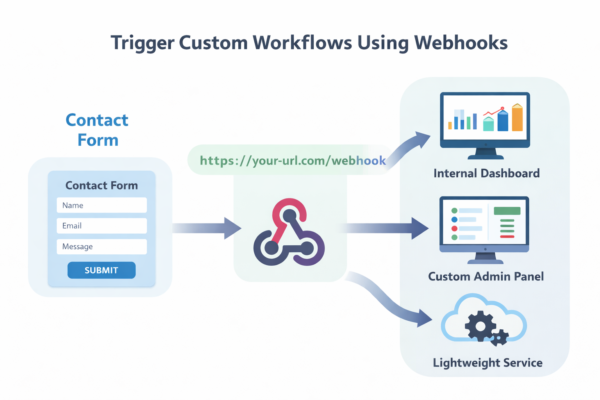
One vital distinction matters here. Webhooks only send data. They do not decide what follows next. Any logic, validation, or processing resides within the receiving system.
Think of webhooks as delivery pipes. They process data reliably. They do not interpret it.
Webhooks work best as targeted tools, not as a replacement for entire automation systems.
Method 5: Store, Export, and Reuse Submissions Automatically
Automation moves data forward. Storage protects it.
Even with real-time integrations in place, retaining form submissions still matters. Storing submissions provides a dependable fallback. If a downstream system is unavailable or a workflow needs to be reprocessed, the original data remains intact. It is highly valuable when leads, requests, or records cannot be recreated.
Exports support operational and compliance needs that integrations alone do not resolve. Teams often require historical snapshots for audits, backups, or platform migrations. Having submissions available in a structured, exportable format reduces reliance on any single tool.
Typical use cases include periodic client reports, monthly performance analysis, and maintaining compliance records when retention policies apply.
This approach does not replace integrations. It complements them. Data can flow into CRMs, marketing tools, or internal systems as it arrives, while a stored copy remains available for review and reuse.
Automation works best when delivery and retention operate in parallel, not in competition.
Choosing the Ideal Automation Method (Quick Comparison)
Once you understand the available options, the next step is to shortlist the method that aligns with how your data should be routed and where it should reside. This quick comparison helps you self-select without overthinking tools or features.
Quick recommendations
- Sales-driven teams → Direct CRM or API
- Founders and operations teams → Google Sheets for visibility + CRM for ownership
- Marketing workflows → Automation platforms
- Product or internal tools → Webhooks
- Compliance-heavy workflows → Stored submissions
| Criteria | Direct CRM / API | Google Sheets Sync | Automation Platforms | Webhooks | Stored Submissions |
| Speed | Instantly | Immediately | Straightaway | In real-time | Deferred or on-demand |
| Scalability | High | Low to medium | Medium | High | Medium |
| Best for | Lead capture, sales workflows | Visibility, simple tracking | Multi-tool actions | Custom systems | Audits, backups, reporting |
| Technical effort | Low (configuration-based) | Low | Low to medium | Medium | Low |
| Data ownership | CRM or system of record | Spreadsheet-centric | Platform-dependent | Destination-defined | Fully retained |
Each method resolves a different problem. Direct APIs favor scale and ownership. Google Sheets prioritizes visibility. Automation platforms optimize convenience. Webhooks support custom flows. Stored submissions ensure continuity.
The ideal choice depends on where decisions take place and how much control you need.
Common Automation Mistakes to Avoid
Automation often fails not because of tooling, but because of vague design decisions made early on.
One standard mistake is automating before defining ownership. If it is unclear which system owns the lead or request, automation only amplifies confusion. Hence, decide where the data should reside before configuring any workflow.
Another issue is treating email as the workflow. Email works smoothly for notifications, but it cannot track state, confirm processing, or enforce accountability. When forms rely on inboxes to carry data forward, gaps appear quickly.
Over-routing data is another hidden risk. Sending every submission to multiple tools “just in case” creates duplication, conflicting records, and complicates cleanup later. Process with intent, not abundance.
Another overlooked issue is lack of delivery confirmation. If submissions are sent without logging responses or failures, automation silently breaks. Reliable workflows observe outcomes, not just triggers.
Many setups also skip testing and logging. Without observing responses or recording failures, issues stay invisible until something breaks downstream.
Reliable automation comes from well-defined ownership, deliberate routing, and observable behavior, not from piling on integrations.
Final Thoughts: Start With the Flow, Not the Tool
Effective automation starts with flow design, not plugin selection.
Before choosing plugins or platforms, define your data’s immediate trigger and its long-term destination.
Tools only support workflows. They do not define them. Planning automation around transparent ownership, defined destinations, and noticeable outcomes makes it reliable by default rather than brittle over time.
Start by mapping the flow. Identify the system that should receive, process, and retain the data. Then apply automation methods that reinforce that structure rather than working around it.
If you want to take this further, a helpful next step is exploring how automation pairs with form design itself. This guide on boost conversions by blending Contact Form best practices with automation walks through that connection in practical terms.


