



Most business owners treat the contact form as a formality. A box to tick. Something that sits quietly at the bottom of the page. You already know how that ends.
Leads arrive late. Or incomplete. Or not at all. Sometimes the inquiry shows up after the prospect has already made a decision elsewhere. If your form submissions usually arrive ar the project is already over, we have a situation.
The problem is rarely traffic. It is a leakage. Industry research shows that more than 60% teams report that poor data disrupts handoffs and hinders sales momentum. That friction quietly erodes trust and revenue.
Great UX reduces friction. Contact form automation removes lag. When both work in harmony, you increase form conversions without adding noise.
Why Contact Form Best Practices Still Matter (Yes, Even in 2026)
Concise forms still convert better in 2026 because attention is scarce.
Transparent, conversational labels still outperform clever ones because people scan, not study.
Mobile-friendly layouts are crucial because most intent now happens between meetings, not at desks.
A neat visual hierarchy still guides action faster than any persuasion trick.
A single, deliberate CTA text still sets expectations and removes doubt.
There is a quiet cost to ignoring it. Recent industry research indicates nearly 73% teams admit their lead data is inaccurate or outdated. That erosion often starts at the form level, where hurdles invite mistakes and incomplete submissions.
People do not want to write their autobiography only to ask for a quote. Remember,
- Every extra field is a question.
- Every unclear label is a hesitation.
- Every awkward layout is a reason to delay.
That is why contact form best practices remain the foundation if you want to increase form conversions.
Automation cannot rescue a form that creates friction. It only accelerates whatever experience you have already built.
Quick UX Wins That Boost Contact Form Conversions Fast
You have probably seen this pattern play out. Two businesses offer the same service. One gets steady inquiries. The other keeps asking why leads feel “cold.” The difference is execution.
Industry trends point to the same quiet truths: Forms convert better when they respect momentum.
Fewer interruptions. Fewer decisions. Fewer moments where someone has to stop and think.
Small barriers stack up quickly and drag results down. Removing these obstructions immediately moves the results.
That is why teams often see lift without redesigns, rewrites, or campaigns. Most gains come from obvious things left undone. Not as a theory. As a friction removal.
And when friction drops, it increases form conversions without adding effort elsewhere.
Here is the ultra-practical part.
Simple changes. Measurable lift.
Mistakes Business Owners Make With Contact Forms (And How To Fix Them)
Here is where outcomes start to split.
Agency Owner A is busy. His form requests everything upfront: company size, budget, timeline, and comments.
The CTA size is small. The follow-up relies on an email inbox no one really owns. Leads arrive late or not at all. He assumes demand is weak.
In contrast, Agency Owner B experiences the same traffic. Her form asks only what is needed to respond.
The CTA is apparent. Submissions move instantly where they belong. Nothing waits in an inbox. Nothing gets missed.
The difference is not effort; it is structure.
Most contact forms fail for predictable reasons:
- Asking for too much information creates barriers.
- Tiny CTAs hidden in corners hinder action.
- Long dropdowns invite abandonment.
- Delay follow-ups turn interest into silence.
If your form appears like a 2003 government passport application, customers will consider competitors.
These mistakes quietly erode your ability to increase form conversions.
The story changes with contact form automation in place — Immediate routing of submissions. Follow-ups are consistent. Capturing warm intent.
The form stops being decorative and begins to do real work.
Why Contact Form Automation Is the Missing Piece for Conversions
You can design a polished, high-intent form and still lose the lead. The failure rarely sits in the interface. It happens after submission.
A prospect reaches out → The message lands in an inbox → It waits → Ownership blurs.
By the time someone responds, the moment has passed. Visually captivating UX cannot survive slow operations.
That is why contact form automation matters. Not as an upgrade. As protection.
When submissions move in real-time, intent is warm. There is no manual forwarding. No copy-pasting. No guessing who owns the response.
Leads are instantly routed to the correct system when context and urgency are still fresh.
Agency owners feel this immediately. You cannot follow up on a high-intent inquiry two days later and expect a win. Your competitor already stepped through it.

How Automating Contact Form Submissions Works (Simple Explanation)
You already understand the outcome you want. A lead comes in. Someone acts. Nothing gets lost in between.
Here is what actually happens when you automate contact form submissions.
A visitor fills out your form. The moment they hit submit, Contact Form 7 to Any API sends that information straight to the system that needs it.
Your CRM. Your email tool. Your helpdesk. Your internal database.
No waiting. No inbox detours.
It works through direct API based delivery. It means the data moves from your WordPress website to the destination in a clean, structured format.
The best part:
- Each field goes exactly where it belongs.
- The routing is immediate.
- Alerts happen in real-time.
- There is no human step required to keep things moving.
Contact form automation works best when it stays invisible. Nothing changes for the visitor. Everything changes for your operation.
Think of it like hiring a reliable assistant who never forgets to pass on a message. Every submission is delivered instantly. Every time. That is how automation protects intent rather than chasing it later.
The Winning Combo: Contact Form 7 UX + CF7 to Any API Automation
At this point, the pattern is clear. Conversions improve when three things work in harmony:
- A polished UX sets intent.
- Proper validation shields data quality.
- Automation ensures nothing slips through.
Removing any one of them quietly degrades performance.
Contact Form 7 already handles the front end smoothly when configured with discipline. Contact Form 7 to Any API completes the equation on the back end.
There is no coding layer to maintain. No scripts to debug.
Submissions are validated server-side, filtered for duplicates, and mapped cleanly to the fields your systems actually expect.
The best part: The data matches the API schema before it ever leaves WordPress.
Nothing is stored. Nothing is rerouted through third parties.
Each submission is delivered in real-time to your CRM, email platform, or internal system.
Logs exist for reliability, not surveillance.
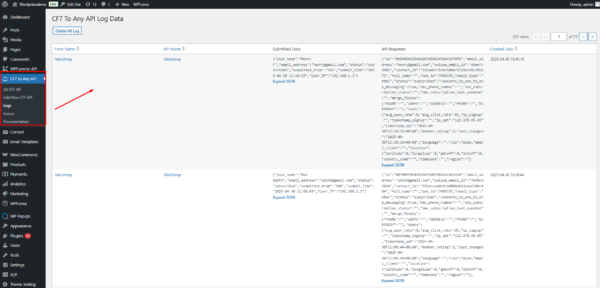
Your CRM should not be optional. The lead should not ‘maybe’ get there.
Automating contact form submissions in this manner ensures:
- Follow-ups become predictable.
- Speed becomes consistent.
- Teams have clarity on where leads went and act on them immediately.
That reliability is what increases conversions over time. Not campaigns. Not hacks. A system that does precisely what it promises, every time.

Checklist: Create a High-Converting, Automation-Ready Contact Form
At this point, the direction is clear. The question is execution.
The difference between contact forms that convert and those that quietly underperform is not design. It is what happens before, during, and immediately after submission.
This checklist exists to prevent intent from leaking once a user hits Submit.
✔ Keep the form short and focused on response, not qualification.
✔ Use unambiguous, direct field labels that produce usable data downstream.
✔ Add a single, outcome-driven CTA that signals what happens next.
✔ Validate fields properly so only accurate data enters your system.
✔ Display a success message that confirms completion and closes the loop.
✔ ️ Design mobile-first by default, not as an afterthought.
✔ Automate submissions with CF7 to Any API so intent is handed off instantly — not queued.
✔ Route every submission directly to your CRM via API, without inbox dependency.
✔ Verify delivery through API logs for assurance and transparency.
✔ Test the entire journey yourself, end-to-end, including failure states.
These contact form best practices are not about polishing the form, but rather about owning what happens to intent after submission.
Conversions follow naturally when execution is tight. Leads move seamlessly, and follow-ups become predictable.
Most importantly, conversions stop depending on chance and begin to reflect how well the system operates.
FAQs
How many fields should my contact form have to increase conversions?
Most industry benchmarks indicate fewer fields performing better. Ask only for what helps you respond. Each additional field adds a barrier and reduces completion rates, even during high intent.
Why do people abandon contact forms?
Friction and delay do the damage. Long forms, unclear labels, and slow follow-ups break momentum. When users hesitate or feel ignored after submitting, interest drops quickly.
How does Contact Form Automation improve conversions?
Contact form automation removes lag. It routes submissions instantly, accelerates replies, and prevents leads from getting lost in inboxes. Real-time delivery protects intent and reduces leakage after the click.
Does automation require coding?
No. Contact Form 7 to Any API enables you to automate CF submissions visually. It handles API delivery behind the scenes, allowing data to reach the right system without scripts or custom development.
Does Contact Form 7 store customer data?
Contact Form 7 to Any API does not store form data. It transfers submissions directly from WordPress to your chosen system. It ensures ownership, privacy, and control stay entirely with you.
Can I integrate different CRMs or tools?
Yes. Contact Form 7 to Any API works with any platform that supports an API. This flexibility allows you to connect multiple CRMs or business tools without changing your contact form setup.
Can automation work with multiple forms or websites?
Yes. Automation scales across forms and sites when the workflow is consistent. CF7 to Any API supports multiple forms and setups. It allows teams to manage integrations centrally without duplicating logic or adding new tools.


