


JSON mapping problems are rarely obvious at first glance.
The request goes out. The endpoint is reached. There may even be a success response. But somewhere between the form submission and the destination system, things stop lining up. Records are missing, fields are empty, or workflows do not behave the way you expect.
In many of these cases, the issue is not the API itself and not Contact Form 7. It is the shape of the data being sent. More specifically, it is a mismatch between the JSON structure you are sending and what the API actually expects.
This article explains how incorrect JSON mapping breaks API requests triggered by Contact Form 7, why these issues are so common in real setups, and how to recognize them before they quietly undermine your automation.
JSON that “looks right” can still be wrong
One of the most misleading aspects of JSON mapping issues is that the payload often looks reasonable.
Field names are present. Values are populated. The structure appears clean when you inspect it. Yet the API either rejects the request silently or accepts it without producing the expected result.
This happens because APIs do not just care about values. They care deeply about structure, nesting, data types, and context. A payload that is valid JSON can still be completely unusable to the receiving system, which is why many APIs rely on strict schema validation.
When using Contact Form 7 to Any API, you have full control over how form fields are mapped into JSON. That flexibility is powerful, but it also means small mismatches can have outsized consequences.
Where JSON mapping usually goes wrong
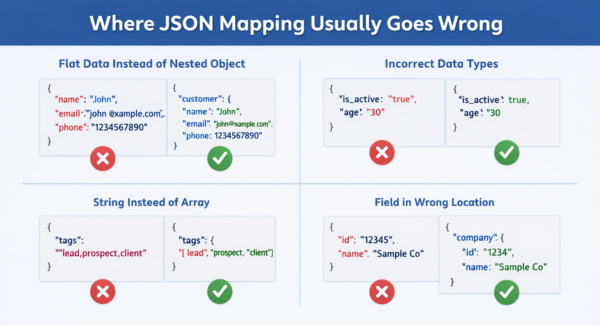
Once you start debugging these issues across multiple projects, the same patterns show up again and again.
Flat data sent where nested objects are required
Many APIs expect structured objects, not flat key-value pairs.
For example, an API might expect a customer object with nested fields like name, email, and phone. If the payload instead sends all those fields at the top level, the API may accept the request but ignore the data entirely.
We often see this when forms start simple and mappings are built quickly, without fully mirroring the API’s expected schema.
Incorrect data types that pass unnoticed
Contact Form 7 fields are strings by default. APIs rarely want everything as a string.
Numbers, booleans, arrays, and objects all matter. Sending “true” instead of true, or “123” instead of a numeric value, can be enough for an API to drop a field or reject processing internally.
These issues are especially hard to spot because the payload still looks populated and complete.
Arrays that are not actually arrays
Another common problem involves lists of values.
APIs often expect arrays, but mappings sometimes send comma-separated strings instead. From a human perspective, the intent is clear. From the API’s perspective, the data is invalid.
This tends to surface only when workflows depend on iterating over those values, at which point nothing behaves as expected.
Required fields placed in the wrong location
Some APIs require certain fields to exist inside specific objects, not just anywhere in the payload.
A required identifier sent at the root level instead of inside the expected object can cause the entire request to be ignored, even though the field technically exists.
A familiar real-world scenario
This usually shows up after a form has already been “in production” for a while.
A lead form starts simple and is wired to an API with a straightforward payload. Early tests look fine, so the setup is considered done. Then real requirements creep in. Marketing asks for extra fields. Operations want conditional sections. Someone adds hidden tracking values. The API still responds, so no one suspects anything is wrong.
Weeks later, records start appearing without key fields, or stop appearing altogether for certain submissions. There is no clear moment when things broke. The integration did not fail overnight. Instead, the data slowly drifted out of alignment with what the API expects.
Because requests are still being sent successfully, attention usually goes to authentication, endpoints, or server limits first. JSON structure is rarely the first suspect, even though it is often the root cause.
Why APIs rarely tell you exactly what is wrong
Many APIs validate JSON structure internally and fail quietly when something does not match.
Instead of returning a detailed error, they may:
- Ignore invalid fields
- Skip record creation
- Route the data into a fallback state
Accept the request but do nothing useful with it
From the outside, this looks identical to the request reached the API but no data appears problem discussed in this article, but in reality, incorrect JSON mapping is often the root cause.
Questions that come up when JSON mapping is the issue
The payload looks correct. Why is the API still ignoring it?
Correctness is defined by the API’s schema, not by how readable the JSON looks. If nesting, data types, or field placement do not match expectations, the API may discard the data silently.
Why did this work during testing but fail later?
This usually happens as test submissions often use ideal values. Real users trigger conditional paths, optional fields, and edge cases that change the structure of the payload.
Shouldn’t the API return a validation error?
Some APIs do, but many do not. Especially when validation happens after the request is accepted, failures may never surface as explicit errors.
Is this a limitation of Contact Form 7?
No. Contact Form 7 only provides the form data. Contact Form 7 to Any API sends exactly what you map. If the structure does not align with the API’s schema, the failure happens downstream.
How to recognize JSON mapping problems early
The most reliable signal is inconsistency.
If some submissions work and others do not, and authentication and timeouts have already been ruled out, JSON mapping should be the first place you look.
Compare payloads from working and non-working submissions side by side. Focus on structure, not just values. Differences in nesting, empty objects, or missing arrays usually stand out once you know what to look for.
It is also worth validating your payload against the API’s example requests, not just its field list. APIs often assume a specific structure that is not fully obvious from parameter tables alone.
Why this issue keeps coming back if it is not fixed properly
JSON mapping problems persist because they evolve with the form.
As forms grow more complex, the payload changes. If mappings are not revisited with the same care as the original setup, the structure slowly drifts away from what the API expects.
Because requests still go out and responses still come back, the issue hides in plain sight until missing or incorrect data forces a deeper investigation.
This is why treating JSON mapping as a one-time task rarely works. It needs to evolve alongside the form and the API schema.
When incorrect JSON mapping should be your top suspect
You should investigate JSON mapping immediately if you notice:
- Records being created without key fields
- Data appearing inconsistently across similar submissions
- Workflows triggering unpredictably
- Success responses with no meaningful outcome
In most cases, the fix is not dramatic. It involves aligning the payload structure more closely with the API’s expectations. Once that alignment is restored, the integration usually stabilizes quickly.
If submissions are failing entirely under load, timeouts may be involved instead, which is covered in API Timeout Errors When Sending Data from Contact Form 7. If requests are blocked outright, authentication issues are discussed in Authentication Errors When Sending Contact Form 7 Data to External APIs.
Taken together, these issues form a clear progression. Incorrect JSON mapping sits right in the middle, quietly breaking requests that appear to succeed.


