


Authentication errors are rarely noisy, but they are always decisive.
A 401 or 403 response means the API has rejected the request, even if everything else appears to be working. The form still submits correctly, the frontend shows no error, and nothing looks broken at first glance. Yet no data ever reaches the destination system.
This mismatch between what looks fine on the surface and what fails behind the scenes is why authentication issues are some of the most persistent problems agencies face when sending Contact Form 7 submissions to external APIs.
This article explains what actually goes wrong when authentication fails, why these failures are so common in real agency setups, and how to approach authentication in a way that stays reliable even as teams, credentials, and environments change.
What went wrong?
When an external API returns a 401 or 403 response, it is explicitly rejecting the request before any data processing takes place.
The API receives the request and understands its structure, but based on the credentials or permissions provided, it determines that the request is not authorized to proceed. This distinction between authentication and authorization is often misunderstood, and the difference between HTTP 401 and 403 responses is explained clearly in this Stack Overflow discussion. As a result, the API does not evaluate field mappings, does not run validation rules, and does not execute any workflows. The request is discarded immediately.
When Contact Form 7 to Any API sends a request and receives one of these responses, it means the integration failed at the authentication layer. This is not a Contact Form 7 issue, and it is not caused by JSON structure or field mapping. The request never reaches that stage.
Why authentication failures are common in agency environments
Authentication errors rarely come from one obvious mistake. They usually grow out of how agency projects actually run, across multiple clients, systems, and teams.
From a developer’s point of view, authentication often feels “done” once it works during initial testing. In reality, it is one of the most fragile parts of any integration. API tokens expire, credentials get rotated, permissions change, and security rules evolve over time. Any one of these changes can cause requests to start failing, even when no code or WordPress configuration has been touched.
APIs are also very strict about how credentials are sent. A token can be perfectly valid and still be rejected if it is placed in the wrong header, missing a required prefix, or formatted slightly incorrectly. These details seem minor, but they are enough to block the request entirely.
From an agency owner’s perspective, the problem looks different. Credentials are often handed over by clients during onboarding, set up once, and then left alone. Ownership is rarely documented clearly. When something breaks later, it is often unclear who created the key, what access it was meant to have, or whether it belongs to staging or production. Even when the control sits with the client or an external vendor, the agency still carries responsibility for the result.
This is what makes authentication failures feel so opaque and frustrating. Everything else can look correct, yet the integration simply refuses to move forward.
The most common causes of 401 and 403 errors
Authentication errors when sending Contact Form 7 data to external APIs typically occur due to one or more of the following causes.
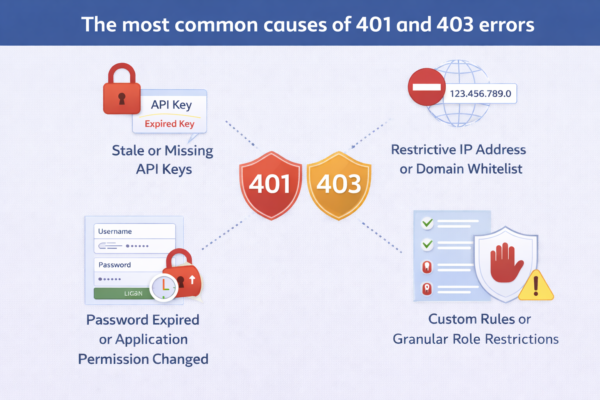
- Expired or rotated credentials
Many APIs issue credentials that expire or are periodically rotated for security reasons. When an expired token is used, the API will reject the request even if the configuration has not changed. This often happens silently until someone notices missing data. - Incorrect header structure or formatting
APIs expect authentication data in very specific header formats. Common issues include missing prefixes such as Bearer, incorrect header names, extra whitespace, or placing credentials in the request body instead of headers. Even small formatting errors cause immediate rejection. - Environment mismatches between credentials and endpoints
Staging and production environments usually have separate credentials. Sending staging credentials to a production endpoint, or production credentials to a staging endpoint, results in authentication failures that can be mistaken for permission issues. - Hidden access restrictions imposed by the API
Some APIs restrict access based on IP address, domain, or referrer. When hosting infrastructure changes or traffic routes differently, previously valid credentials may be blocked without any visible configuration change on the WordPress side. - Insufficient permission scopes
An API key may be valid but lack the required permissions for a specific endpoint or action. In this case, the API rejects the request even though authentication technically succeeded.
How Contact Form 7 to Any API fits into authentication
Contact Form 7 to Any API gives you full control over how authentication headers are sent with each request. You can configure custom headers, authorization formats, and environment-specific values directly within the plugin.
What the plugin does not do is abstract authentication away or bypass API security rules. If an API rejects a request with a 401 or 403 response, Contact Form 7 to Any API has already completed its role by sending the request correctly. The refusal happens entirely on the API side.
Understanding this boundary is important. It keeps debugging focused on the authentication layer rather than on form configuration or field mapping.
What breaks if authentication issues are ignored?
Authentication failures completely stop automation.
No data is processed, no retries succeed, and no partial records are created. From an operational standpoint, this means form submissions can continue to look successful to users while backend systems receive nothing.
In agency setups, this often leads to delayed discovery. Problems surface during audits, client reviews, or sales follow-ups, when missing data becomes impossible to ignore. At that point, teams may introduce manual workarounds or additional tools, increasing complexity instead of fixing the root cause.
If API requests succeed but data does not appear in the destination system, that is a different issue and is explained in this related article. On the other hand, if failures do occur intermittently under load, checking whether API timeouts are happening or not might be a good idea.
When should agencies treat authentication as a first-class concern?
Authentication should be actively reviewed whenever:
- A new integration is launched
- Credentials are rotated or regenerate
- A site moves from staging to production
- Hosting infrastructure changes
- Responsibility shifts between internal teams or external developers
Authentication is not a one-time setup step. It is a dependency that requires clear ownership and periodic verification.
Frequently asked questions
The API key is correct. Why am I still getting a 401 error?
A correct API key is only one part of authentication. The API may still reject the request if the key is sent in the wrong header, lacks the required permission scope, has expired, or is being used against the wrong environment.
Why does authentication work in staging but fail in production?
Staging and production environments typically use different credentials and often enforce different security rules. Production APIs may also restrict access by IP or domain, which can block requests that work in staging.
Can Contact Form 7 to Any API automatically refresh expired tokens? Token refresh depends entirely on the API’s authentication model. If an API requires token refresh logic, that behavior must be designed explicitly. Contact Form 7 to Any API sends requests exactly as configured.
Is this a limitation of Contact Form 7?
No. Contact Form 7 only triggers the submission. Authentication happens between WordPress and the external API. A rejection at this stage is controlled entirely by the API.
Should we add middleware to avoid authentication issues?
Middleware can help in certain architectures, but it should not be a default response. Most authentication errors can be resolved by improving credential ownership, environment separation, and documentation.


