


Why Basic Contact Form Emails Aren’t Real Email Automation
Most Contact Form 7 setups stop at sending an email notification. A visitor submits a form, the inbox receives a message, and the system considers the job done. That is not Contact Form 7 email automation; it is alerting.
Email notifications do not create marketing workflows to send CF7 leads to the email platform. They do not segment contacts, apply tags, or place leads into a lifecycle; They only surface raw data and rely on someone to decide what happens next.
From both a marketing and systems perspective, this creates friction. Leads arrive, but campaigns don’t start. Follow-ups rely on inbox habits, context gets lost, and nothing confirms the lead entered a workflow.
That gap is why many teams struggle to scale email marketing from form submissions.
If your form only sends an email, your automation still starts after the inbox.
What “Contact Form 7 Email Automation” Actually Means
Contact Form 7 email automation is not about improving how emails are sent. It is about what happens to form data after submission, at a system level.
Think of the form as the trigger, the email platform as the engine, and the API as the transmission that keeps everything moving without manual intervention. That is where Contact Form 7 email automation shifts from notifications to workflows.
Instead of landing in an inbox, form data is sent directly into the email platform, where automation logic already exists.
Contacts are added or updated in real time. Tags or lists are applied based on intent. Prebuilt sequences begin automatically. Delivery success is logged, not assumed.
That is also where WordPress form email integration becomes meaningful. The form is no longer the endpoint. It becomes the entry point to a marketing system.
For developers, it means predictable data flow and observable outcomes. For marketers, it means faster follow-ups, cleaner segmentation, and campaigns that start immediately.
That alignment is what allows teams to send CF7 leads to email platforms as part of a growth stack, not only to collect messages.
Common Ways People Connect CF7 to Email Tools (and Their Limits)
When teams want to move beyond basic form notifications, they usually start by extending what Contact Form 7 already provides: email delivery.
The most usual setup routes submissions to a shared inbox or distribution list. Someone then reviews the message and forwards the data into a CRM, email platform, or spreadsheet. It works at low volume, but it turns form submissions into a manual intake process rather than a marketing trigger.
Some teams add intermediary connectors to push form data into a single email marketing tool. These setups reduce copy-paste work and can create contacts with minimal configuration. However, they still follow a narrow path: one form, one destination, one predefined structure.
As marketing requirements expand, the limits surface quickly. Routing logic stays minimal. Adding a second destination or switching platforms often requires reconfiguration or replacement rather than reuse.
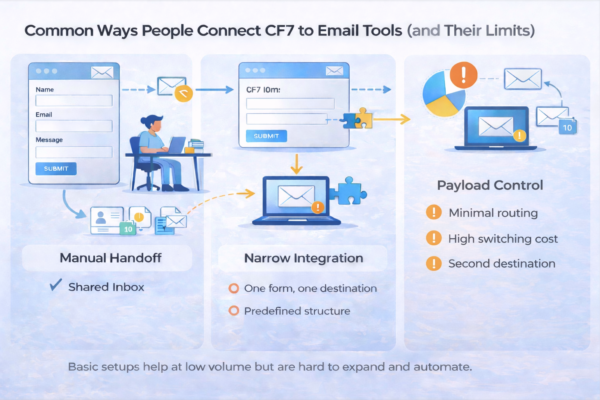
All three approaches move messages, not systems. That difference becomes painful as volume, routing, and segmentation grow.
The Shift: From Email Routing to API-Driven Email Automation
At some point, teams outgrow email-based routing, not because tools are limited, but because it was never intended to be the entry point for Contact Form 7 email automation.
Modern email platforms expect clean inputs, such as contact attributes, consent signals, and source context. That data fuels segmentation, triggers sequences, and determines how campaigns behave over time.
Research on email marketing effectiveness consistently shows that timely, relevant, and well-segmented communication drives competitive advantage, not volume alone.
Email notifications cannot provide that structure. APIs exist to resolve this exact problem. They accept form data as defined fields rather than message content.
Each submission arrives with clarity: who the contact is, what they requested, and how the platform should respond. Campaign logic then runs within the email system, where it belongs.
This shift changes how forms participate in marketing workflows. The form not only sends CF7 leads to the email platform, but it also starts acting as a trigger. It delivers clean data into systems designed to process it.
The benefits compound quickly. You gain total control over fields and custom attributes. When platforms change, the form stays stable because the integration relies on APIs, not inbox behavior.
From a developer perspective, API-driven automation treats form submissions as data events, not messages. From a marketing perspective, it accelerates follow-ups and enables growth-friendly workflows without rework.
That is the foundation of email automation built for advancement, not just delivery. This is where Contact Form 7 email automation stops being a workaround and starts behaving like infrastructure.
How Contact Form 7 to Any API Powers Advanced Email Automation
Contact Form 7 already does its job well by capturing submissions and sending basic notifications. Email automation begins when those submissions need to enter a marketing system that can act on them.
Contact Form 7 to Any API provides that bridge.
The flow remains straightforward. A visitor submits a CF7 form. Instead of formatting the data for human reading, the submission is structured into a JSON payload. Each field maps cleanly to a defined attribute and is sent directly to the email platform’s API.
From there, the marketing system stays in control.
For example, a demo request form can tag a contact as high intent, enroll them in a short pre-demo sequence, and notify sales instantly from a single submission.
Contacts are created or updated. Tags or lists apply based on form input. Campaigns and workflows execute using logic that already exists within the platform.
Contact Form 7 to Any API does not introduce marketing rules or campaign decisions. It acts as a routing infrastructure, ensuring that form data reaches the correct systems in the format they expect.
This enables coordination rather than one-off automation. The final destination owns the logic. The form stays stable. The automation layer adapts as tools, campaigns, and strategies evolve.
Real-World Email Automation Scenarios You Can Build
Email automation delivers the most value when it supports how teams operate across marketing, sales, and support.
A lead capture form can route directly into an email platform, where contacts enter a nurture sequence aligned with acquisition goals. Engagement data stays centralized, making it easier to refine campaigns over time.
Webinar signups benefit from coordinated actions. A single submission can place contacts into a targeted list, apply interest tags, and schedule reminder emails. All this while maintaining accurate records for future campaigns.
Demo requests often require parallel workflows. One submission can notify sales while enrolling the prospect into a short pre-demo sequence. It builds context and improves conversion quality.
Support forms follow a different pattern. They can trigger transactional confirmations while syncing data into internal systems for tracking and reporting.
Across these scenarios, one submission reliably fuels multiple workflows without duplication — Automation shifts from isolated actions to coordinated systems that scale with the business.
Step-by-Step: Sending CF7 Leads to Any Email Platform via API
At this point, the mechanics should feel familiar. The goal is not to learn a new interface; it is to confirm that your form submissions move into email workflows reliably and predictably.
This setup does not change how your form looks or behaves for users.
- Begin by selecting the existing Contact Form 7 form. There is no need to change the markup, validation rules, or user experience. The submission itself remains the trigger.
- Next, choose the email platform’s API as the destination. It could be your marketing platform, a transactional email service, or a system that activates email workflows downstream. It is where Contact Form 7 email automation shifts from notifications to structured delivery.
- Configure authentication at the API level. API keys, tokens, or OAuth credentials live here, making access explicit and auditable rather than tied to WordPress mail settings.
- Then map form fields to contact attributes. Each input aligns with a defined field, tag, or list so the platform understands exactly how to process the lead. This step ensures you can consistently send CF7 leads to an email platform without losing context.
- Submit a test entry and inspect the response. A successful API response confirms that the contact was created or updated and triggers the relevant sequence.
- Finally, verify outcomes within the email platform itself, not in an inbox. You can view the contact, the applied tags, and the activated workflow.
For a detailed walkthrough, check out the Step-by-Step Guide to send CF7 Submissions to any email platform using Contact Form 7 to Any API.
API Automation vs. Traditional CF7 Email Integration (Comparison)
When teams evaluate Contact Form 7 email automation, the actual difference shows up once workflows start scaling. The comparison below highlights how traditional CF7 email delivery differs from API-driven automation at a system level.
| Aspect | Traditional CF7 Email Integration | API-Based Email Automation |
| Flexibility | Fixed flow from form to inbox or single platform | Adaptable routing to one or multiple systems |
| Platform dependency | Tied closely to a specific email tool | Platform-centric and easier to switch later |
| Payload control | Data flattened into email content | Structured fields mapped to contact attributes |
| Scalability | Becomes brittle as volume and logic grow | Handles increasing volume and complexity |
| Marketing readiness | Notifications first, campaigns later | Campaigns trigger immediately on submission |
Traditional integration focuses on delivering a message. API automation focuses on getting data into motion.
Routing emails is entry-level. API automation is growth-ready.
Best Practices for CF7-Driven Email Marketing Automation
Effective Contact Form 7 email automation depends on clarity and long-term planning, not just connections.
- Commence with explicit consent. Accurate opt-in ensures contacts enter email platforms with defined intent and compliant usage from the outset.
- Separate ingestion from notification. Notification emails inform teams that a submission occurred. Ingestion sends structured data into marketing systems, where automation triggers. Mixing these concerns makes workflows more challenging to maintain and debug.
- Log API responses consistently. Observable delivery and processing signals transform automation into a system you can trust rather than assuming.
- Use tags over rigid lists whenever possible. Tags allow segmentation strategies to evolve without restructuring the entire campaigns.
- Design with migration in mind. Email platforms, campaigns, and strategies are dynamic. When form data enters systems cleanly and predictably, transitions remain controlled instead of disruptive.
Automation stays reliable when form data is treated as a durable input rather than a one-off message.
Final Thoughts: Treat Forms as the First Step in Your Marketing System
Contact Form 7 is not where marketing happens. It is where intent enters your system. The actual work begins after submission, within the email platforms that manage contacts, campaigns, and lifecycle logic.
Strong contact form 7 email automation treats the form as a trigger, not a destination. Email platforms do the heavy lifting by segmenting audiences, triggering sequences, and measuring engagement. APIs connect those pieces by moving data cleanly and smoothly from intent to action.
Contact Form 7 to Any API quietly plays that role here. It does not replace your tools. It ensures your forms feed them the way modern marketing systems expect, and automation supports growth to compound it.
That is how workflows stay future-ready, measurable, and ready for what comes next. It distinguishes setup from strategy. When form submissions enter systems cleanly, automation compounds instead of breaking.


