


A high-intent property inquiry should never depend on someone checking an inbox. Yet on many real estate websites, that is exactly what happens. An interested buyer submits a form, ready to take the next step, but the inquiry is routed to email, sits unread, and loses momentum within minutes.
By the time a response is sent, the opportunity has often shifted elsewhere.
This gap between intent and response is one of the most common and costly inefficiencies in real estate lead capture. Contact forms are frequently treated as simple message collectors rather than critical conversion points.
As a result, valuable inquiries are delayed, mishandled, or lost entirely, impacting both revenue and customer experience.
An effective approach replaces passive email-based forms with direct, API-driven workflows. Instead of waiting to be seen, inquiry data is instantly delivered to the right systems and teams, enabling immediate routing, faster responses, and structured follow-ups.
This shift is not about adding complexity, but about redesigning how form data moves the moment it is submitted.
This guide explains how to move from traditional contact forms to a real-time, API-connected lead capture system that improves speed, increases conversion potential, and ensures that every high-intent inquiry is handled with the urgency it demands.
Why Most Real Estate Contact Forms Lose Leads Before You Even Read Them
If you have a contact form on your website, you probably believe it is working.
Submissions come in → you get an email → you take follow up.
The system seems functional. But look closer, and several serious problems emerge.
-
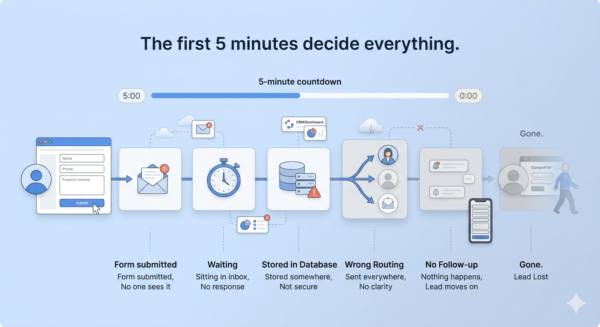
Leads go cold fast. Look out for the 5-minute rule
Research consistently shows that responding to an inquiry within 5 minutes dramatically increases the likelihood of conversion.
Most contact forms send email data into an inbox that nobody monitors in real time. By the time someone reads and responds, the window has closed.
-
Sensitive data sits in your WordPress database
Standard contact form plugins store submissions in your website database before forwarding them. Buyer financial details, phone numbers, and address preferences are sitting in a server that may not be adequately secured. This is both a security liability and, in many jurisdictions, a compliance problem.
-
One-size-fits-all routing
A buyer inquiry for a 2BHK apartment goes to the same inbox as a commercial leasing query. There is no separation, no prioritization, and no intelligence applied. Leads land with the wrong person or get lost entirely.
-
No follow-up automation
The form submits → A thank-you page appears. Then nothing.
No instant notification to the relevant agent. No triggered email sequence. No acknowledgment to the lead that their inquiry has been received and is being handled.
-
Poor mobile experience
Over 60% of property searches now happen on mobile. Long, single-page forms kill conversions on phones. If your form isn’t thumb-friendly, you’re losing a significant share of your highest-intent traffic.
-
The competition has already moved on
Multi-step forms, conditional logic, pop-ups timed to exit intent, CRM integration, and chatbots the bar has risen. A standard contact form is no longer a neutral choice. It is a competitive disadvantage.
So what does an optimized real estate lead capture system actually look like?
Foundational Framework: What a High-Converting Real Estate Lead Capture Form Actually Looks Like
Before thinking about backend automation, the form itself needs to be right. A high-converting form is not just one that looks clean; it is designed to reduce friction, build trust, and collect exactly the information your team needs.
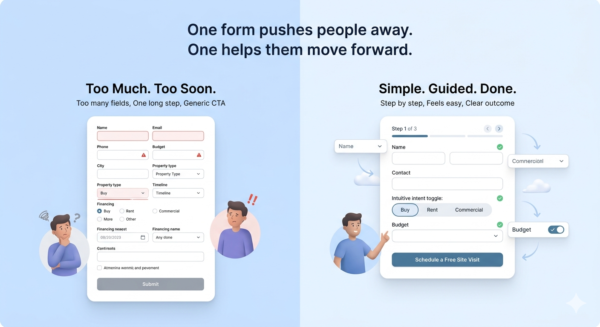
<insert bad form vs high-converting form image>
- Keep it focused. Only ask for what you need: name, phone or email, intent (buy/rent/commercial), and property preference. Every additional field is a reason to abandon the form.
- Use multi-step forms. Break one long form into two or three short steps. Each step feels easier to complete, and you get more completions overall.
- Add conditional logic. Show relevant fields based on what the user selects. A ‘buy’ selection reveals a budget range field. A ‘rent’ selection reveals a move-in timeline. This makes the form feel personalized rather than generic.
- Design for mobile first. Large touch targets, minimal scrolling, and auto-formatted fields (phone number, postcode) make a significant difference on mobile.
- Use specific CTAs. ‘Schedule a Free Site Visit’ converts better than ‘Submit.’ The CTA should name the outcome the user is getting.
- Place forms strategically. Above the fold on key landing pages, on individual property listing pages, and as exit-intent pop-ups for users about to leave.
- Add social proof near the form. A short testimonial or a line like ‘500+ families helped find their home’ next to the form improves trust and increases completions.
A well-designed form captures the lead. But what happens to that data next is what separates an average system from a powerful one.
The 5 Types of Real Estate Inquiry Forms Every Property Website Needs
One generic contact form cannot do the job of five.
Each form type is designed around a specific visitor intent, and placing the right form in the right context is what turns browsers into leads.
1. Schedule a Visit Form
Captures high-intent buyers who are ready to see a property. Fields: preferred date and time, property ID or listing reference, contact details. Place this directly on individual property listing pages, where intent is highest.
2. Request Pricing / Get a Quote Form
Attracts buyers and investors at the consideration stage, they want to know if it fits their budget before going further. Fields: property type, budget range, timeline. Place this on project overview pages and in-demand listing categories.
3. Call Me Back Form
For leads who prefer talking over typing. Minimal friction by design. Fields: name, phone number, best time to call. Place this prominently in the header or as a floating button on mobile.
4. Home Valuation Request Form
A lead magnet specifically for sellers. Offering a free valuation is a low-barrier way to capture seller details. Fields: property address, property type, approximate size. Place this on dedicated landing pages targeted at homeowners.
5. General Inquiry / Property Search Form
For broader-intent leads who are exploring rather than ready to act. Fields: location preference, property type, number of bedrooms, budget range. Place this on the homepage and main property search pages.
Having the right form in the right place is step one. But all five of these forms share a common challenge, where the data goes and how it is handled once it gets there.
Without a unified system, the same lead can appear as duplicate contacts across multiple forms. So how do you route inquiries in real time while maintaining a single, clean CRM record?
Real Estate Form API Integration – How Contact Form to API Works
The fundamental problem with the majority of real estate is what happens after a form is submitted.
Data gets written to a database, an email gets generated, and then it sits waiting for a human to act. Contact Form to API changes the entire flow.
-
What ‘form to API’ means in simple terms
When a visitor submits a form, the data is sent directly to any external system like your CRM, a WhatsApp Business API endpoint, a Google Sheet, or a custom webhook, without being stored in WordPress at any point. The data moves immediately, directly, and to exactly where you need it.
-
Why this is a fundamental shift
Traditional plugins store data in a database and then try to forward it. This approach skips storage entirely and routes data in real time. There is no intermediate step, no delay, and no single point of failure in your website backend.
-
The no-storage model
Sensitive buyer and seller data, contact numbers, budget ranges, address preferences never sit in your website backend. This is both a security advantage and a compliance one. Under GDPR compliance and similar data privacy regulations, not collecting data you do not need is itself a compliance best practice.
-
What you can connect it to
- Any CRM: Zoho, Salesforce, HubSpot, and more
- WhatsApp Business API for instant agent notifications
- Google Sheets for lightweight tracking and reporting
- Email marketing platforms for automated nurture sequences
- Slack for team alerts on high-priority inquiries
- Custom webhooks for bespoke integrations
-
Multi-endpoint support
A single form submission can simultaneously notify the relevant sales agent on WhatsApp, create a contact record in your CRM, and trigger the first email in a nurture sequence. One submission, three actions, zero manual work.
-
Reliability and visibility
A real-world concern with any API-based system is failure handling. What if an API call does not go through? A well-implemented system includes retry logic for failed calls and failure logs that track and allow resending of missed submissions. No lead is silently lost, and your team has full visibility into every inquiry.
-
Simple setup – no custom code required
Configure the API endpoint and map your form fields to the corresponding fields in your target system, and the data flows automatically. For most setups, this takes under an hour.
Once you understand what API integration makes possible, the next question is, how do you make sure the right lead reaches the right person?
Smart Lead Routing – Sending the Right Inquiry to the Right Team Automatically
For a solo agent, routing is simple. For a real estate firm with multiple teams handling different property types, it becomes a critical operational problem, one that API-based forms solve elegantly.
The problem it solves
A firm operating across residential sales, residential rentals, commercial leasing, and luxury properties cannot afford a single shared inbox. When all inquiries land in the same place, leads get delayed, misrouted, or missed entirely.
How conditional routing works
The value of a form field, for example, the inquiry type selected by the visitor, triggers a conditional rule that sends the submission to a different API endpoint or team. The routing decision happens automatically, at the moment of submission.
Practical examples
- Buy inquiry → Residential sales CRM pipeline, senior agent notified by email
- Rent inquiry → Rentals team WhatsApp group, with move-in date and budget included
- Commercial inquiry → Commercial team email and CRM, flagged as high priority
- Luxury property inquiry → Direct WhatsApp notification to senior agent with full details
Beyond inquiry type
Routing rules can be applied to any field. Route by city or neighborhood. Route by property type, villa, apartment, plot. Route by budget range, so a lead above a certain threshold automatically triggers an alert to your highest-performing closer.
A real-world scenario
A real estate agency runs multiple campaigns across different channels like Google Ads for luxury villas, Facebook Ads for affordable housing, and organic traffic for rental listings.
- Without API-based routing, every inquiry flows into the same inbox with little context. The sales team has no clear visibility into where the lead came from or how urgent it is. High-intent buyers from paid campaigns end up waiting alongside low-priority queries, and follow-ups are delayed or inconsistent.
- With API-based routing, each submission is enriched and directed instantly. Leads from high-budget campaigns are prioritized and sent to senior sales reps, rental inquiries go to the leasing team, and every entry is automatically tagged with its source inside the CRM. This allows the team to respond faster, tailor conversations based on intent, and focus effort where it matters most, turning incoming inquiries into qualified opportunities without manual intervention.
Routing gets the lead to the right person. But speed of response is what actually converts that lead. Here’s how to make follow-ups instant.
How to Automate Property Inquiry Follow-Ups and Never Let a Hot Lead Go Cold
The first agent to respond wins a disproportionate share of conversions. This is not opinion, it is a pattern repeated across every high-performing real estate team.
The challenge is that ‘fast response’ cannot depend on someone happening to check their inbox at the right time.
-
What an instant follow-up workflow looks like
Form submitted → data hits CRM → auto-email sent to lead confirming receipt → WhatsApp notification sent to relevant agent with full inquiry details → optional calendar invite or callback scheduler triggered automatically.
All of this happens in under 30 seconds, without any human input.
-
High-intent trigger
When a lead submits a ‘Schedule a Visit’ form, the system immediately sends them a confirmation message with available time slots. The lead feels attended to. The agent gets notified. No back-and-forth required.
-
Drip campaign trigger
A lead who submits a ‘Request Pricing’ form but has not converted after 48 hours automatically enters a nurture sequence, project updates, a recent testimonial, and a follow-up call prompt. The sequence runs without anyone setting it up manually each time.
-
High-value lead alerts
If the budget field in a form submission exceeds a defined threshold, the system fires an instant alert to a senior agent’s WhatsApp with the full lead details. High-priority leads get high-priority attention automatically.
-
The result
Leads feel attended to immediately. Agents work from a prioritized queue rather than a chaotic inbox. No inquiry gets forgotten. And the follow-up consistency that used to depend on individual discipline now runs on autopilot.
Now that data is flowing and follow-ups are running automatically, there is one more layer worth understanding: keeping that data safe.
Why the No-Storage Model Matters for Real Estate Websites
Collecting buyer and seller data carries responsibility. Most real estate websites collect more sensitive information than they realize, like financial range, current address, family size, and move-in timeline, and store it in a database without much thought about what happens if that database is compromised.
-
The risk of storing lead data in WordPress
Website databases can be breached. Plugin vulnerabilities, weak passwords, and outdated software are common attack vectors. Buyer financial details, phone numbers, and property preferences sitting in a database represent a significant liability both legally and reputationally.
-
What the no-storage model means in practice
With Contact Form to API, data passes through the form directly to your chosen endpoint. Nothing is written to the WordPress database. There is no table of leads to be exposed, no backup file containing sensitive records, and no unnecessary data retention.
-
GDPR and real estate compliance
Under GDPR and similar regulations, collecting personal data creates legal obligations around retention, access, and deletion. Not storing data unnecessarily reduces your compliance surface area significantly. It is easier to comply with a regulation when you are not holding data you do not need.
-
Reinforcing trust on the form itself
Add a short privacy note near the submit button: ‘Your details are never stored on this website and will only be used to respond to your inquiry.’ This small addition meaningfully increases trust and completions.
-
Encrypted data transfer
All API submissions must travel over HTTPS. This encrypts data in transit between your form and the receiving endpoint. This is a baseline requirement, not an optional extra.
Security builds trust with leads. But how do you know which forms are actually performing? That’s where tracking comes in.
Tracking, Testing, and Improving Your Forms Over Time
Setting up an optimized lead capture system is not a one-time exercise. The forms, the routing, and the follow-up sequences. All of it should be treated as a system to be measured and improved continuously.
-
Track conversion rates by page
Which property listing pages generate the most inquiries?
Which generates none despite high traffic?
Form analytics by page reveal where leads are coming in and where potential leads are being lost.
-
Lead source tracking
Know whether a submission came from Google Ads, Facebook, organic search, or a property portal.
Use UTM parameters mapped directly to your form API payload so that source data is captured in your CRM alongside every lead record.
-
A/B test form elements
Test different CTAs like ‘Schedule a Free Visit’ and ‘Book a Property Tour’.
Test different form lengths, i.e., a 3-field version and 5-field version.
Test inline forms vs pop-ups.
Small changes in form design regularly produce 20–30% differences in conversion rate.
-
Measure time-to-response
Set a benchmark of 5 minutes, for example, and track whether your API integration is actually hitting it. If response times are slipping, the data will show you why and where the delay is happening.
-
Lead quality scoring
Use the data your form collects, client details like budget, purchase intent, and timeline, to score leads in your CRM. Your team calls the hottest leads first rather than working through a queue in submission order.
-
Iterate based on data
Remove fields that cause drop-offs. Add fields that improve lead quality. Revisit form placement quarterly. Treat your lead capture system as a living part of your business, not a static page element.
With all of these pieces in place, here is how to put it together from scratch.
Contact Form to Any API for Your Real Estate Website
This is the practical implementation guide. Follow these steps in order and your system will be live and running on autopilot.
- Install and activate the Contact Form to Any API plugin on your WordPress site from the plugin directory.
- Create your inquiry form. Choose the right form type for each page,, like visit, pricing, call back, valuation, or general inquiry, and configure conditional logic so the right fields appear based on what the user selects.
- Configure your API endpoint.Connect your CRM (Zoho, HubSpot, or Salesforce), your WhatsApp Business API, Google Sheets, or any custom webhook URL. You will need the endpoint URL and any required authentication headers.
- Map your form fields to your API payload. Match each form field, which are name, phone, intent, and budget to the corresponding field in your target system. This is where you define exactly what data goes where.
- Set up routing rules. Define which lead type goes to which endpoint. Buy intent routes to CRM pipeline A and send an email to the residential sales team. Rent intent sends a WhatsApp notification to the rentals team. Commercial intent routes to the commercial desk CRM.
- Enable instant notifications. Configure a WhatsApp or email alert to fire the moment a high-intent form is submitted. Set a budget threshold above which a senior agent is alerted directly.
- Add CAPTCHA or OTP verification. Prevent spam submissions that waste your team’s time and pollute your CRM with junk records.
- Test the full flow. Submit a test inquiry for each form type and verify it reaches the correct CRM pipeline, triggers the correct notification, and does not store any data in WordPress.
- Place forms strategically on the site. Above the fold on key landing pages, on individual property listing pages, and as exit-intent pop-ups. Add UTM tracking to capture lead source data in every submission.
Once this setup is complete, it runs on autopilot. Leads route automatically. Follow-ups trigger without manual input. Your team works from a clean, prioritized queue rather than a chaotic inbox.
Your Real Estate Leads Deserve Better Than an Email Inbox
Real estate lead capture has moved past being just about collecting inquiries. In fact, it has become about how quickly and intelligently you act on them.
A well-designed form captures the inquiry. But without a system to process, route, and respond in real time, even high-intent leads lose value within minutes.
API-based form handling closes this gap, transforming a passive entry point into an automated workflow that routes instantly, prioritizes by value, and ensures every submission reaches the right destination without delay.
If your current setup relies on email-based handling, the practical next step is to audit where delays are actually happening: at routing, at notification, or at follow-up. Once you’ve identified the gap, the implementation steps in this guide map directly to fixing it.
For teams exploring CRM options alongside this, comparing platforms on criteria like API accessibility and webhook support is a natural companion step.
With Contact Form to API, you can implement this shift without adding complexity. Inquiry data is sent directly to your CRM and sales tools in real time, with full control over routing logic and no data stored on your server. It is designed to help teams respond faster, reduce manual effort, and handle every property inquiry with the urgency it deserves.
Ready to get started?
Install Contact Form to API, set up your first form, and see how fast your team can respond when the system handles the routing for them. If you want to go deeper, explore how WhatsApp API integrations work for real estate, or how to compare CRM platforms for property businesses – both are natural next steps once your lead capture is running properly.


