


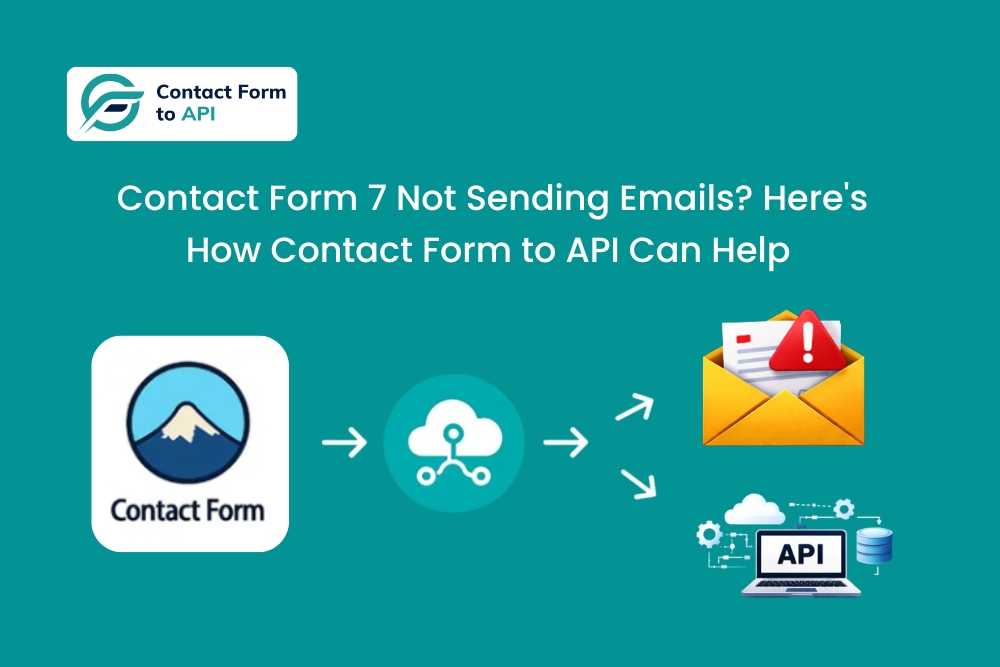
The Symptom: “Form Submitted Successfully”… but No Email
Imagine this: A user submits a Contact Form 7 form, and a success message pops up. The page reloads. Everything works as intended. However, when you check the inbox, nothing is there. No error. No bounce. Sometimes it works, sometimes it doesn’t.
This is the classic Contact Form 7 showing sent message but not receiving email scenario that developers encounter. The form is not broken. If it were, submission would fail outright. The problem is almost always delivery.
In many scenarios, the email never reaches the inbox or lands in spam without warning. On other websites, delivery works during testing and fails quietly in production. That inconsistency is what makes this issue frustrating.
Hence, this guide focuses on why Contact Form 7 email delivery fails, why typical patches remain fragile, and how developers can route submissions reliably using API-based delivery instead of relying solely on email.
Why Contact Form 7 Not Sending Emails Happens (Even When Configured Correctly)
When developers try to fix Contact Form 7 email issues, the assumption is often that a broken form or misconfigured plugin is the bottleneck. In reality, the failure usually sits below that layer.
Contact Form 7 relies on WordPress’s wp_mail() function, which in turn depends on PHP mail. That mechanism was never designed for reliable application messaging. Many hosting providers restrict or throttle outbound mail to prevent abuse, and those limits apply to legitimate form submissions.
Authentication adds another fragile dependency. SPF, DKIM, and DMARC records must align precisely with the sending domain.
If the “From” address does not match the domain configuration, mail servers may silently drop the message without returning an error. WordPress still reports success because the handoff technically occurred. Many Reddit forum discussions highlight these scenarios.
Spam filtering compounds the uncertainty. Even correctly authenticated emails can be delayed or filtered based on server reputation, content patterns, or traffic spikes. The exact form can behave differently across staging, production, or client environments.
Even Mailgun’s State of Email 2024 highlights how often messages fail, get delayed, or disappear without precise signals. The issue is rarely with Contact Form 7 itself. It is the email transport layer underneath it.
Limitations of Traditional Fixes for Contact Form 7 Email Issues (SMTP, Plugins, Mail Settings)
Strengthening email delivery is a reasonable response to a WordPress Contact Form 7 email error. SMTP plugins, authenticated mailers, and reinforced sender settings all reduce outright rejection. In many setups, they are necessary.
What they do not change is how the workflow behaves after delivery.
Even when SMTP works perfectly, submissions still terminate in an inbox. The system cannot observe what happens next. Someone must notice the message, interpret it correctly, and take action. That step is manual, inconsistent, and invisible to the application.
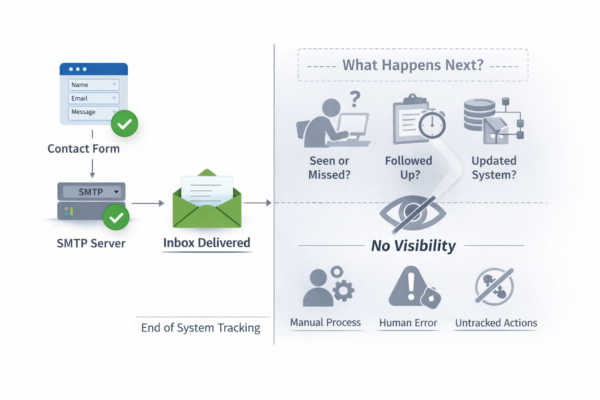
From a debugging perspective, it creates blind spots. Logs can verify that WordPress handed a message to a mail server. However, they cannot confirm whether the submission entered a workflow, reached the correct team, or triggered the intended follow-up.
Success and failure look identical from the system’s point of view.
Traditional fixes also flatten data. Structured form input becomes unstructured text. Routing requires manual forwarding. Monitoring spans inboxes, mail servers, and human behavior.
That is why these fixes feel temporary. Delivery enhances, but the underlying constraint remains untouched.
The Core Problem Behind Most WordPress Contact Form 7 Email Error
Email mostly feels like an obvious output because it has always been there. However, it was never designed to behave like a data pipeline.
Contact forms collect structured data — Names, intent, context, and metadata. Email immediately flattens that structure into text and hands it off to an inbox with no guarantee of execution. There is no concept of state, ownership, or completion.
A message can be sent, filtered, read late, or ignored entirely, and the system has no way to distinguish them.
Every additional step after delivery relies on human behavior. Someone must observe the email, understand its purpose, and forward the data. As workflows grow, that assumption becomes fragile.
When developers troubleshoot a Contact Form 7 email issue, they often focus on why the message did not arrive. The most important question is why email is the only place the data goes in the first place, not why it failed.
The architecture changes immediately once you treat emails as the destination.
How API-Based Delivery Resolves CF7 Email Issues at the Root
Replacing email as the endpoint requires a delivery chain designed for systems, not inboxes. That is where API-based routing emerges.
The form submission is treated as an event with API delivery. Contact Form 7 to Any API still validates input and completes the request, but the data is sent directly to a destination system through an API. That destination can be an email service, a CRM, a helpdesk, or an internal application.
The difference is observability.
APIs return explicit responses. If the endpoint responds with a success status, it means the system has received data. If it fails, the failure is visible, loggable, and actionable. Delivery becomes measurable rather than assumed.
This approach replaces inbox dependency with system-level confirmation. Data stays organized. Routing is intentional. Failures surface immediately rather than weeks later, through client complaints.
Email does not disappear. It becomes one possible outcome of a submission, not the backbone of delivery. The workflow gains clarity because the form now feeds systems that can acknowledge, process, and act on data reliably.
That shift is what turns form handling from best-effort notification into dependable infrastructure.
Common Contact Form 7 Email Delivery Problem Scenarios Where API Routing Wins
API-based delivery becomes easier to understand when you see where it fits in real workflows. There are scenarios that developers encounter repeatedly when dealing with Contact Form 7 not sending emails or unreliable inbox delivery. For instance,
- A basic contact form often needs to trigger a transactional email. Instead of relying on WordPress mail, the submission can route to an email service API. Delivery is confirmed, logged, and independent of hosting mail limits.
- Support forms benefit even more. Rather than emailing a shared inbox, submissions directly generate tickets inside a helpdesk system. Context travels with the request. Nothing waits for someone to notice a message.
- Sales inquiries usually need more than one action. A single submission can create or update a CRM record and send an internal notification email simultaneously. Sales systems receive data immediately, while email remains optional.
- Lead capture forms often feed marketing automation tools. API routing preserves structure to ensure appropriate lists receive contacts, triggers fire correctly, and follow-ups kick off without manual steps.
These flows also support conditional routing. Various form values can send data to multiple destinations. Staging and production environments stay isolated to ensure tests never pollute live systems.
One submission. Multiple outcomes. Fully observable delivery. That is where API routing consistently outperforms inbox-based workflows.
Steps to Fix Contact Form 7 Not Sending Emails Using an API-Based Alternative
At this point, the goal is not to learn another plugin interface. It is to understand the delivery path and confirm that submissions move through it reliably. Here is how you can use Contact Form 7 to Any API as a dependable email alternative.
- Start by selecting your existing CF7 form. No redesign or validation changes are needed. The form works exactly as it does today.
- Choose where the submission should go. This can be an API-based email service, a CRM, or any internal system. You can also send the same submission to multiple tools without duplicating the form.
- Map each form field to a structured JSON payload so data is sent with clear labels instead of messy email text.
- Add the required authentication such as API keys or tokens. This stays outside WordPress email settings. You can also route submissions conditionally based on form values.
- Send a test submission and check the response. Success or failure is visible immediately, and files can be sent directly instead of as email attachments.
- Finally, verify delivery through logs rather than inboxes. You always know what was sent and when.
For a deeper walkthrough, refer to the Step-by-Step Guide for sending Contact Form 7 submissions to any email platform using Contact Form 7 to Any API.
When to Use SMTP vs. When to Use API
Developers often ask whether SMTP is “enough” or if API-based delivery is necessary. The answer depends on what you expect after the form submits: an email notification, or a reliable data pipeline that feeds real workflows. Here is a tabular comparison to simplify that.
| Aspect | SMTP-Based Delivery | API-Based Delivery |
| Reliability | Improves inbox placement but still depends on mail servers and filters | Confirms delivery through explicit responses from the destination system |
| Visibility | Limited to “email sent” status with no insight beyond that | Full visibility into success, failure, and response codes |
| Automation readiness | Ends at the inbox and requires manual handling afterward | Feeds structured data directly into systems that act on it |
| Failure handling | Silent failures are common and hard to trace | Failures are detectable, loggable, and can be retried intentionally |
| Scalability | Becomes fragile as volume and workflows grow | Designed to scale across environments and destinations |
SMTP plays a crucial role when email itself is the goal. It strengthens delivery and reduces spam issues.
However, from a developer perspective, SMTP is a patch. API delivery is infrastructure. It treats form submissions as data that must arrive reliably, be observed, and trigger workflows without guesswork.
Best Practices to Avoid Lost CF7 Submissions Going Forward
Form submissions need more than inbox delivery. Email should be a notification, not the source of truth. Relying on inboxes is where reliability problems start.
- Always log submissions when they are delivered. Whether the data goes to a CRM, email service, or internal system, logs confirm it arrived and show how the system responded.
- Use test endpoints during setup and staging. This helps you verify payloads, authentication, and responses before real leads come in.
- Keep data capture separate from notifications. Send and store structured data first, then trigger emails. If an email fails, your data is still safe
- Monitor failures automatically. Track response codes, retry when needed, and alert on errors. Reliable workflows are monitored, not assumed.
Strong form systems are built on visibility and control, not inbox checks.

Final Thoughts: Stop Debugging Email — Start Designing Workflows
Most Contact Form 7 not sending email issues don’t originate from broken code. They arise from treating delivery as an afterthought instead of a system boundary.
Forms represent the initial contact between users and your systems. What happens after submission determines whether data becomes usable input or disappears into operational noise.
Constantly debugging email failures is a signal that the workflow itself needs redesign, not reinforcement.
Reliability stops being a hope and becomes a property of the system when submissions move through explicit, testable interfaces. Failures surface early. Success is observable. Ownership is clear.
That is the shift this guide implies. Not replacing one mailer with another, but designing form workflows that behave like dependable infrastructure.
Contact Form 7 to Any API fits naturally into that model by turning submissions into controlled, auditable data flows rather than inbox events.
If the data matters, the pipeline should too.


