


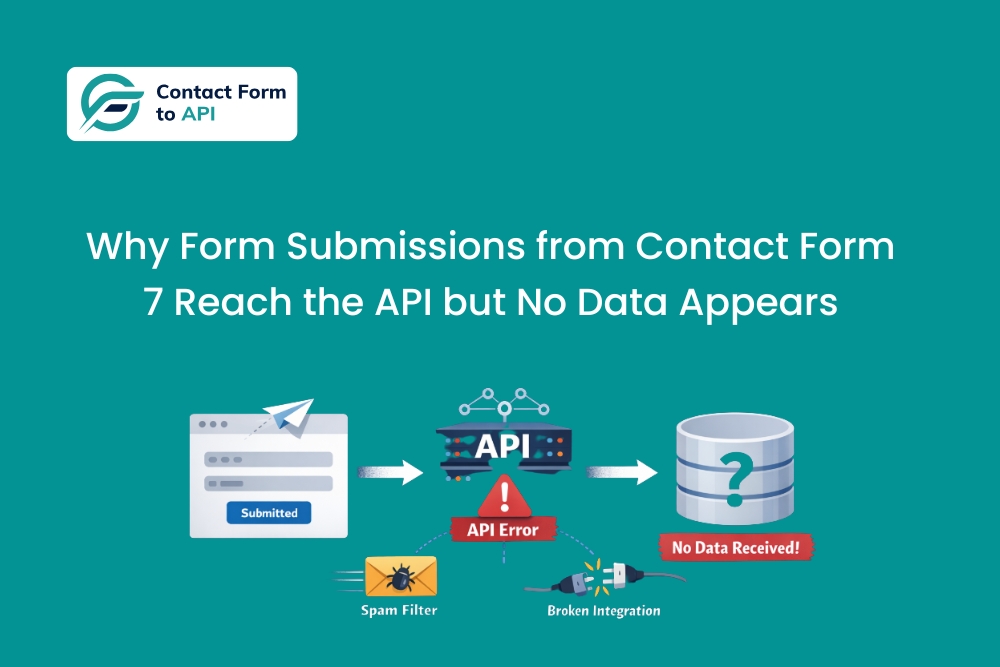
This is one of those issues that sounds contradictory until you have dealt with it a few times.
You can see that the form submission is being sent. The API endpoint is hit. There are no authentication errors, no timeouts, and no visible failures during submission. Everything looks fine from the WordPress side. Yet when you check the destination system, there is nothing there. No lead, no record, no update.
What makes this problem particularly frustrating is that it creates a false sense of success. Because the request goes out and the API responds, attention moves on. Only later does someone notice missing data, often during reporting, follow-ups, or client reviews, when it is much harder to trace what went wrong.
This article explains why Contact Form 7 submissions can successfully reach an external API and still result in no usable data, what that usually means in real systems, and how to approach the problem without guessing or adding unnecessary complexity.
What “reaching the API” actually means
When people say that a submission “reached the API,” they usually mean that the request was delivered and a response was received. That confirmation only tells you that the request arrived, not that it was accepted or processed, as explained in how HTTP status codes work.
When Contact Form 7 to Any API sends a submission, its role is to package the form data and deliver it to the configured endpoint. Once the API responds, that part of the process is complete. What happens next is entirely controlled by the external system.
This distinction is important, because many APIs are designed to acknowledge requests even when they later decide that the data cannot be used.
Silent acceptance is more common than visible failure
In real integrations, APIs often fail quietly.
It is very common for an API to return a 200 or 202 response even when something about the data is not acceptable. Required fields may be missing, values may be in the wrong format, or internal business rules may prevent record creation. Instead of returning a clear error, the API acknowledges the request and then discards the data internally.
We have seen CRM APIs accept submissions but skip record creation because a required field resolved to an empty value after conditional logic ran. From the WordPress side, everything looked successful. From the CRM side, the submission never qualified to be stored.
This behavior is very different from authentication errors or API timeouts, which block the request entirely and are easier to identify. Here, the request gets through. The data just does not survive.
Where data typically disappears after the API call
Once you start looking for patterns, missing data usually falls into a small number of repeatable scenarios. The challenge is that none of these scenarios necessarily produce explicit errors.
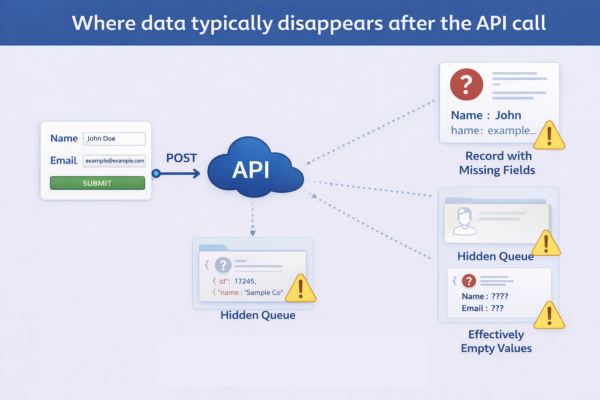
The most common ones we see are the following.
- The API creates a record but silently drops specific fields
In this situation, the API accepts the request and creates a record, but certain fields are discarded during processing. This often happens when field names look correct but do not exactly match the API schema, or when values are sent in the wrong data type, such as numbers or booleans being sent as strings.What makes this difficult to detect is that everything appears to work. Records exist, but critical information like email, source, or identifiers is missing. Teams usually notice this only after data starts looking incomplete or unreliable.
- The submission is routed somewhere unexpected inside the destination system
Many APIs sit in front of systems that use internal routing, workflows, or conditional logic. A submission may be accepted but routed into a pipeline, queue, or object that no one is actively monitoring.
We have seen leads end up in test pipelines, fallback queues, archived states, or internal workflows that are technically valid but practically invisible. From the outside, it looks like the data vanished. Internally, the system behaved exactly as configured. - Fields exist in the payload but resolve to empty or null values at runtime
Contact Form 7 supports optional fields, conditional sections, and dynamically populated values. When those conditions are not met, a field may still exist in the payload but resolve to an empty value.
Some APIs treat empty values for required fields as invalid input. Instead of returning an error, they quietly reject the operation or skip record creation entirely. This often affects only some submissions, which makes the issue feel inconsistent until payloads are compared closely.
A real-world pattern we see repeatedly
A common pattern looks like this.
A form is set up with clean mappings and tested using a few sample submissions. Everything works. Over time, the form evolves. Optional fields are added. Conditional sections appear. Tracking values are introduced. None of these changes feel risky on their own.
Weeks later, someone notices that not all submissions are appearing in the destination system. There is no clear cutoff point, just inconsistencies. Some records exist. Others do not. The integration is questioned, then the API, then the form.
When this happens, the root cause is almost always a mismatch between what is sometimes sent and what the API is willing to accept. The variation comes from user input and conditional behavior, not from the integration logic itself.
Questions that come up again and again
The API returns a success response. Why is there no data?
Because a successful HTTP response only confirms that the request was received. It does not guarantee that the data passed validation or business rules inside the system.
Why does this only happen for some submissions?
Because not all submissions generate the same payload. Conditional fields, optional inputs, and dynamic values can change what is sent, even when the form looks identical to users.
Shouldn’t the API return an error if something is wrong?
Ideally, yes. In practice, many APIs do not. They acknowledge the request and fail silently or partially, especially when validation happens after the request is accepted.
Can Contact Form 7 to Any API tell me what the API did with the data?
No. The plugin can show what was sent and what response was received. What the external system does internally after that point is outside WordPress’s visibility.
How to approach this problem without guessing
The most reliable way to debug missing data is to treat the integration as a pipeline rather than a black box.
- Compare a submission that worked with one that did not
Capture the exact payload sent for a submission that produced a record and one that did not. Differences are often subtle but meaningful. A missing field, an empty value, or a different data type is usually enough to explain the behavior. - Validate the payload against the API’s actual requirements
Check the API documentation for required fields, accepted values, and expected data types. Pay close attention to fields that drive validation or routing logic, not just the obvious ones. - Review workflow and routing logic on the API side
If the destination system uses pipelines, conditions, or workflows, review how those behave when fields are missing, empty, or unexpected. Many systems route data differently based on small variations in input. - Look for patterns across multiple missing submissions
One missing record could be an anomaly. Multiple missing records almost always share a common trait. Identifying that shared trait is usually what leads to the fix.
If submissions sometimes do not reach the API at all, request timeouts may be involved instead.
Why this issue persists and when it should raise red flags
This problem tends to linger because it does not look like a failure. Forms submit successfully, no errors appear, and requests go out as expected. That surface-level success delays investigation until missing data becomes impossible to ignore.
You should treat this as a serious issue as soon as you notice patterns such as records missing without errors, partial or inconsistent data across similar submissions, or different outcomes for submissions that look identical on the frontend.
This is not a transient issue and it rarely resolves on its own. In most cases, the root cause is a small but important mismatch between what is sent and what the API expects under certain conditions. Once that mismatch is identified and corrected, the issue usually disappears entirely.
If you want to go one layer deeper, our article on how incorrect JSON mapping breaks API requests that explains one of the most common underlying causes behind missing data scenarios like this would be a good read.


