


Most teams discover automation issues only after the CRM shows missing leads, incomplete records, or sequences that fired out of order. Everything appears fine on the surface. The form submits. The success message shows. Nothing looks broken.
Yet the lead never reaches the CRM.
This happens more often than people think, and it rarely starts at the CRM or the API. The real failure point is earlier.
The form may display a “submitted successfully” message, but the data behind it does not meet API expectations.
APIs are strict. They accept only what matches their structure, format, and schema. When the incoming data is inconsistent, the API does not adjust. It rejects, truncates, or silently skips, and every workflow built on top of it begins to drift.
Your API integration is only as reliable as the data your form sends.
Why Validation is the First Step in Automated Lead Capture
Most people think of validation as basic user input checks.
Here is an interesting statistic: According to a Gartner report, poor data quality costs businesses nearly USD 12.9 million in opportunities lost every year.
Client side validation ensures a usable form. It catches obvious mistakes, keeps fields clean and improves the experience for the person submitting.
But automated lead capture depends on a deeper layer.
API facing validation ensures the information entering your CRM or automation tool is structured, typed, and predictable. It confirms that every value meets the expectations of your scoring rules, routing logic and segmentation models.
That is where the distinction matters. One layer protects the user experience. The other protects the business. Workflow inconsistencies usually appear when the second layer does not exist.
When you validate only at the form level, defects slip through. When you validate before creating the API payload, those defects surface early and are easier to correct.
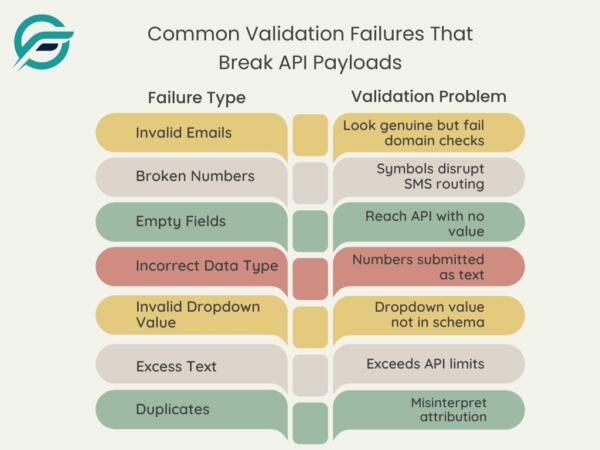
The Most Common Validation Failures That Break API Payloads
Many submissions look fine on the front end but fail once they reach the receiving system. Minor issues at the form level often turn into significant workflow failures.
Here are the most common issues teams encounter:
- Emails that seem correct but fail domain checks. Hence, the CRM never receives a record to trigger a welcome sequence.
- Phone numbers with stray characters that block SMS routing before it reaches your provider.
- Required fields that appear filled but reach the API as empty strings. It can skip Salesforce assignment rules or HubSpot list enrollment.
- Numeric fields submitted as text, and scoring engines refuse to calculate them.
- Dropdown values that don’t match the CRM schema, thereby sending leads into the wrong pipeline.
- Text fields that exceed character limits get truncated.
- Duplicate submissions that misinterpret attribution create conflicting histories.
These issues seem small until they disrupt automation downstream.
How Validation Failures Impact API Requests and Automation Reliability
APIs do not negotiate with inconsistent inputs. They either process a request cleanly or fail in ways the user never sees.
In automated lead capture, that invisible behavior is exactly where reliability gets lost.
At the API level, the pattern is familiar:
- Some requests are rejected outright.
- Some go through partially and create incomplete CRM records.
- And others fail silently with no visible error.
Once this happens, the workflows that depend on those fields do not fire. Segmentation rules that rely on specific values break. Lead scoring becomes unpredictable.
Marketers experience this as missing leads, unreliable reports, broken attribution, and sequences that pause without warning.
Developers see type mismatches, parsing errors, and inconsistent payloads that behave differently each time. Debugging slows because the error does not originate where it appears.
This is why validation before payload creation becomes essential.
How Contact Form 7 to Any API Fixes These Issues at the Mapping and Payload Level
Contact Form 7, Zapier, Make, and CRMs all have their place. The issue is not capability. The issue is timing. Each tool validates at a different stage, and most of them validate too late.
For instance:
- Native CF7 validation supports front end usability, but it does not shape data into a structured payload that an API can rely on.
- Zapier and Make validate after the API call. You see the error only once something has failed.
- CRM validation triggers after the record arrives. Invalid data has already entered the system.
Contact Form 7 to Any API steps in earlier, at the point of contact form API integration. Hence, the payload leaving WordPress is already shaped for the receiving API.
In practice, Contact Form 7 to Any API:
- Direct field mapping that aligns each Contact Form 7 input to the correct CRM field. Clear ownership of where every value goes.
- Required-field enforcement before the API call, not after it fails. Only complete, usable data leaves WordPress.
- Format checks for email, phone, and dates that match the receiving API’s standards. APIs get values they can act on.
- Structured JSON payloads that follow the target schema every time. No guesswork. No improvisation.
- Input sanitization that removes characters and spacing APIs typically reject. The payload stays clean and predictable.
- Duplicate prevention that stops repeated leads from entering your CRM. Attribution stays correct. Pipelines stay stable.
- Error logs that show exactly why a request didn’t process and display duplication. Developers get clarity.
Think of Contact Form 7 To Any API as the practical form validation API that sits inside WordPress. It provides you with control of mapping, structure, and delivery before anything leaves your server. It sets up the real-world examples we look at next.
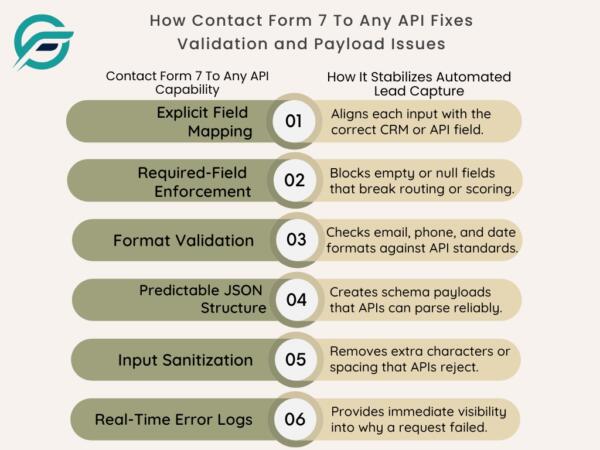
| Contact Form 7 To Any API Capability | How It Stabilizes Automated Lead Capture |
| Explicit Field Mapping | Aligns each input with the correct CRM or API field. |
| Required-Field Enforcement | Blocks empty or null fields that break routing or scoring. |
| Format Validation | Checks email, phone, and date formats against API standards. |
| Predictable JSON Structure | Creates schema-aligned payloads that APIs can parse reliably. |
| Input Sanitization | Removes extra characters or spacing that APIs reject. |
| Real-Time Error Logs | Provides immediate visibility into why a request failed. |
Validated vs. Unvalidated Inputs: Real Workflow Examples
Once a submission reaches the API, the difference between validated and unvalidated inputs becomes clear.
Here is how the contrast plays out in real workflows:
- A validated email triggers a welcome sequence. An unvalidated email looks correct to the user but fails domain checks and never reaches the CRM.
- A properly formatted phone number activates SMS routing. A number with stray characters blocks the entire outreach step.
- A required field with validated content triggers segmentation. An empty string causes the workflow to skip the lead entirely.
- A dropdown value aligned to the API schema routes the record accurately. An unrecognized value defaults the prospect to the wrong pipeline.
- Duplicate prevention creates a single, authentic entry. Unchecked duplicates misinterpret attribution and performance metrics.
Validation removes guesswork and lets automation run as intended. It becomes even more critical in the scoring and nurturing systems you rely on.
How Accurate Data Improves Scoring, Segmentation, and Lead Nurturing
Accurate inputs do more than keep API requests clean. They support every downstream decision your automation system makes. And when it isn’t clean? Even the smartest automation starts making the wrong decisions.
Here’s what that looks like:
- Scoring models can only rank a lead correctly if form fields are consistent. One irregular value can throw off the entire score.
- Segmentation weakens when inputs don’t match CRM expectations, placing a lead in the wrong list or leaving them unclassified.
- Routing loses precision when required fields are entered empty or malformed. It either sends the lead to the wrong team or no team at all.
- Nurture sequences are hindered when triggers rely on data that never arrives in a usable form.
When data is validated early, scoring sharpens, segmentation becomes predictable, and nurture flows run without interruption.

Practical Checklist: Is Your API Workflow Data Ready?
We already know automation is only as reliable as the data that enters it. The challenge is assessing data readiness before the API call, not after a failure shows up in the CRM.
This checklist gives both marketers and developers a clear baseline.
✅ Validate every field before the payload is created.
✅ Map each Contact Form 7 input to the correct CRM field.
✅ Format email, phone, and date values so scoring and routing can interpret them cleanly.
✅ Sanitize text inputs to remove characters that APIs routinely reject.
✅ Prevent empty or null values in fields that drive segmentation or routing.
✅ Ensure the JSON payload matches the CRM’s schema without modification.
✅ Confirm that scoring rules receive the correct data types.
✅ Verify workflows trigger on the first successful submission.
✅ Trace API delivery through logs, not inbox notifications.
A workflow that meets these criteria is far more stable and ensures your contact form API integration delivers data your CRM can trust.
Final Thoughts: Clean Inputs Create Reliable Automation
Most automation failures begin quietly. A malformed field. A missing value. A format that the API cannot interpret. By the time the error appears in the CRM, the workflow has already drifted.
Validation catches these issues early and protects the integrity of your lead capture process.
This is where Contact Form 7 to Any API earns its place. It enforces structure before the API call and delivers payloads your CRM can trust. It closes the hidden gaps between form submission and CRM arrival.
No extra middleware. No unnecessary layers. Only a stable, predictable contact form API integration.
Take the first step to stabilizing your form inputs.
FAQs
How do I know if my current setup is causing silent automation failures?
You may notice missing leads, incomplete CRM records, skipped segments, or workflows that do not fire. These patterns typically indicate upstream validation issues.
Can API level validation reduce the number of rejected CRM records?
Yes. When data is structured and validated before the API call, CRMs receive clean inputs and perform more consistently.
What signals show that validation should happen before the API call?
Repeated schema conflicts, type mismatches, or workflows that break only after the CRM receives the record suggest the validation layer is too late.
How does Contact Form 7 to Any API handle complex CRM schemas?
The free plan supports clean JSON payloads for simple schemas. The Pro plan adds nested objects for advanced CRM structures. Both validate before sending data.
Will validation slow down the form?
No. Validation happens during payload preparation. The user experience remains the same while the API receives structured, verified data.


