


Every agency owner eventually discovers a similar uncomfortable truth: Clients don’t lose money because their traffic is weak. They lose money because their contact form quietly breaks the entire conversion chain.
Campaigns perform. Landing pages convert. Offers resonate. However, the moment a user tries to take action, friction appears, and revenue slips through the cracks without warning.
Most agencies hesitate to confront this because their form seems to work as intended on the surface. It functions toward the primary goal: increasing contact form conversions. It loads. It submits. It sends an email.
However, contact form optimization is not sufficient in 2026. Lead costs are rising, user patience is shrinking, and clients expect conversions, not excuses.
That is why we have created this guide to provide you with the perspective most blogs avoid. Your form is not a small UI element. It is the sales engine. Strengthen it, and the entire client pipeline changes.
Let’s show you how.
Why Form Performance Matters More in 2026 for Agencies
In a world where the global lead generation market is expected to grow from USD 5.59 billion to USD 32.1 billion by 2035 at a 17.2 percent CAGR, even minute gaps become disproportionately expensive.
Lead costs are at an all-time high, competition has tightened, and AI answer boxes are reducing the intent behind traffic before it ever reaches your website. It means every form submission now carries a higher financial stake than it did even a year ago.
Remember, a minute drop in performance can be devastating. For instance, a 10% decline in conversions can wipe out an entire campaign’s ROI, even when the ads and landing pages are compelling.
Clients are no longer impressed by clever ads or compelling CTR. They judge the agency on leads, revenue, and whether the form actually converts visitors who are ready to act.
We firmly believe that agencies that optimize lead generation forms with ruthless focus, integrate the contact form with CRM systems for instant handling, and rely on automated lead capture instead of fragile inbox workflows, will succeed in 2026.
Now that the stakes are clear, the next step is identifying what truly stops a user from submitting the form in the first place.
Real Reasons Forms Don’t Convert (Not What Clients Think)
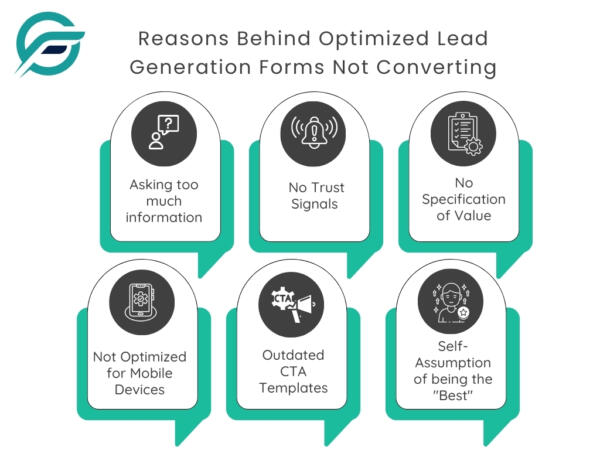
Most clients blame traffic, targeting, or their CRM when conversions drop. The actual breakdown happens at the form itself, long before analytics ever show a problem. Here are some prominent reasons behind the increasing contact forms not converting:
- Forms ask for too much too soon. Extra fields create instant hesitation, and users abandon before even considering the displayed offer.
- There is no trust near the form. Without proof points, credibility cues, or response expectations, users feel unsure about sharing their details.
- The value exchange is unclear. Generic CTAs like “Submit” or “Send” provide no reason to act. The page doesn’t specify what happens after submitting.
- Many forms still load slowly on mobile, rely on outdated templates, or use confusing CTAs that stop momentum cold.
Clients think their form is “fine.” Agencies know it often determines whether a campaign wins or collapses.
Now that the failure points are clear, the next step is understanding the psychology that makes users confident enough to submit.
The Psychology Behind High-Converting Forms
If agencies were judged only on design, most would win awards.
Users don’t convert because the form looks impressive. They convert when the experience feels transparent, safe, and worthwhile.
After reviewing hundreds of underperforming funnels, one pattern always stands out: hesitation kills more conversions than weak traffic. When visitors cannot see the value or outcome of submitting, they leave.
Most business owners assume the offer explains itself, but users want confirmation, not guesses.
What Reduces Hesitation
- Keep language familiar: “Request a call back from an expert” instead of “Submit your inquiry.”
- Use simple field labels: “Work email” instead of “Email address for professional correspondence.”
- Add contextual copy: “Takes 30 seconds” or “No credit card needed.”
What Increases Action
- Use next-step CTAs: “Get a no-obligation quotation,” “Check availability,” “Request callback.”
- Create micro-moment momentum: “Just one question left.”
- Place benefits near the form: “Receive a same-day response.”
What Creates Perceived Safety
- Add a short privacy line: “Your information stays private.”
- Clarify the next step: “We’ll reach out within 24 hours.”
- Provide reassurance: “No spam. No obligations.”
Agencies overlook these details, which make a significant difference between curiosity and commitment.
Once you understand the psychology driving conversions, the next step is understanding fixes.
5 Fixes Agency Owners Can Apply Without Developers
Agency owners often underestimate how much conversion lift they can generate without deep diving into code. Most of the time, the form is not “broken.” It is confusing, untrustworthy, or simply asking too much too soon.
The following are simple fixes that move the needle immediately, even before a developer steps in.
1. Reduce unnecessary fields
- Before: 9-field form asking related to budget, timeline, and company size.
- After: 3 essential fields, with advanced details collected later in the sales process.
Note: Please add an image here of the 9-field form vs the 3-field form.
2. Rewrite your CTA to promise a next step
- Before: “Submit”
- After: “Schedule My Strategy Call”
Note: Please add an image showing a “Submit” button vs. a visually appealing “Schedule My Strategy Call” button.
3. Add brief micro-copy where hesitation occurs
- Before: Empty phone field with no context.
- After: “We only use this to confirm your call time.”
Note: Please add an image illustrating the empty phone field vs. after adding this line: We only use this to confirm your call time.
4. Move a trust indicator beside the form
- Before: Testimonials were buried at the bottom of the page.
- After: A single proof point directly beside the fields.
Note: Please add an image showing no testimonial vs. with testimonial.
5. Clarify what happens after hitting submit
- Before: No explanation keeps the user guessing.
- After: “You’ll get a confirmation email and a response within 24 hours.”
Note: Please add an image with no clarity after form submission vs. after adding this line: You’ll get a confirmation email and a response within 24 hours.
Beyond copy improvements, repositioning the optimized lead generation form itself can significantly bolster performance. For high-ticket services, we recommend using a two-step flow that collects a tiny commitment first, then completes the details.
Remember, once a user takes the first step, the likelihood of completing the second rises dramatically.
Fixes That Require a Developer But Dramatically Boost Conversions
Some improvements cannot be patched from the marketing side because they involve form behavior at its core. When a developer steps in, the gains are far larger and far more permanent. For instance:
- A quicker form load alone can recover conversions you never knew you were losing, especially on mobile, where hesitation spikes within seconds.
- A mobile-first layout prevents the thumb-cramping, zoom-heavy experience that quietly destroys high-intent visits.
- When validation is weak, users waste effort only to see the form reject their submission at the end, killing the momentum.
In our experience, we have observed that inline error handling resolves this. E.g., frictionless Captcha alternatives prevent bots without declining genuine, ready-to-convert users.
We recommend focusing on stable integrations as they are conversion multipliers and ensure the submission reaches the CRM without random failures or missing fields.
Once these structural fixes are in place, the next step is adding trust builders.
5 Trust Builders Agencies Must Add in 2026
Trust is now the strongest conversion trigger on any landing page for increasing contact form conversions, and it is the element agencies still undervalue. Users hesitate less when they feel they are providing their information to a credible, genuine firm.
We recommend implementing the following trust builders:
- Mini testimonials placed directly beside the automated lead capture form help visitors see that real people had tangible outcomes.
- Short case study snippets reassure high-intent users that the service delivers measurable results.
- Industry badges work as instant credibility anchors, especially in niches where compliance or expertise is paramount.
- Privacy reassurance clarifies exactly how their data is used, removing the silent fear that holds many users back.
- Even a simple response time guarantee can shift a hesitant visitor into a confident lead.
In our experience, we have seen many agencies benefit by integrating a contact form with CRM. With over 8,000 downloads and multiple 5-star reviews, Contact Form 7 to Any API often serves as a dependable layer for stable delivery and consistent lead handling.
Remember, treating trust as a conversion asset improves form performance immediately.
The “Message Match” Shift That Increases Conversions Instantly
Message Match is one of the fastest ways of increasing contact form conversions. However, most agencies overlook it because it feels too ordinary.
Users decide in seconds whether the form matches the promise that brought them to the page. When the ad says one thing, the landing page says another, and the form headline says something entirely different, hesitation spikes and conversion flow collapses.
The fix is direct: Align the ad copy, landing page promise, and form headline so the visitor sees one consistent message from intent to submission.
It is one of the most underrated forms of contact form optimization, and it works because clarity reduces friction more quickly than any design tweak.
Example patterns agencies can implement immediately:
- Ad: “We Turn Traffic Into Revenue With Predictable Conversion Flow.”
- Page: “Let’s Fix the Breakdown Between Click and Conversion.”
- Form: “Check Your Conversion Predictability Score”
This alignment alone helps optimize lead generation forms and increases completion rates before you touch layout, fields, or automation.
Once your message is aligned, the next step is demonstrating to clients the future-state lead flow they should aim for.
Why Agencies Lose Money Without Proper Tracking
Most agencies underestimate how much revenue disappears simply because they cannot see what happens between a user landing on the page and submitting the form.
That is where GA4 becomes critical in 2026. Without proper tracking, you are running campaigns ineffectively and hoping the form behaves by luck. That is not a strategy. It is a leak.
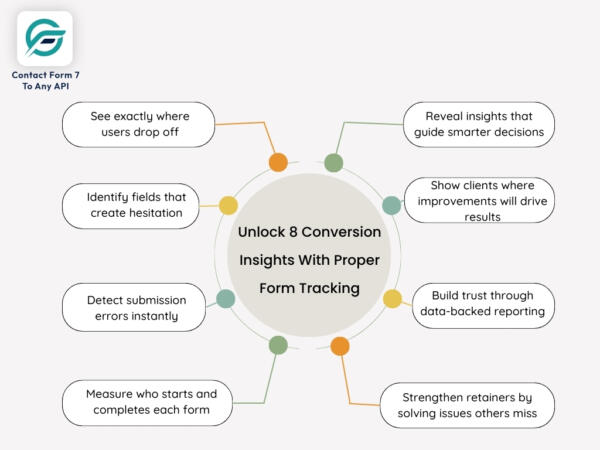
You can’t improve what you cannot see. If you do not know the following, you can’t justify your conversion decisions to clients:
- Where users drop off
- Which fields cause hesitation
- What errors stop submissions
- How many people start a multi-step form but never finish it
Accurate tracking provides you with deeper visibility to prove your value and show precisely where increasing contact form conversions becomes possible.
Remember, business owners who measure everything win more retainers because they resolve problems their competitors never identify.
Once tracking becomes part of your operating system, the final step is showing clients what the full 2026-ready lead flow should look like.
The A/B Testing That Produces Noticeable Wins Your Clients Notice
A/B testing is not about experimenting endlessly. It is about validating the minor, strategic changes that propel the conversion needle fastest. The following are the high-leverage tests agency owners should prioritize because they directly increase contact form conversions and deliver clients measurable ROI:
1. Form Placement
- Test above-the-fold vs. mid-page
- Observe where users take action with the least hesitation
2. CTA Copy
- Swap generic text for value-driven action (e.g., “Get My Free No-Obligation Quote,” “Request Pricing as per my requirements”)
- Focus on clarity, not creativity
3. Form Length
- Short vs. expanded
- Identify the point where drop-offs begin
4. Social Proof Placement
- Testimonials beside the form vs. below it
- Evaluate whether trust reduces hesitation
5. Headline Variations
- Outcome-based vs. benefit-based
- Choose whichever reinforces user intent
6. Offer Framing
- Rephrase the value exchange (e.g., “Request a Free Expert Consultation” vs. “Request a Free Accurate Evaluation”)
- Test which message increases decision readiness
These six controlled tests help agencies build a repeatable optimization package clients understand, value, and continuously invest in.
Why Automations Increase Conversions (And Client Happiness)
Agencies often overlook one simple truth: every minute a lead sits untouched, its conversion probability drops. Research indicates that following up with leads within 5 minutes increases the likelihood of engagement by nine times.
Automation fixes that gap immediately. It provides your clients with something manual workflows can never: speed, consistency, and zero-leak reliability.
Here is where automation creates measurable conversion lift:
Instant CRM, Email, or WhatsApp Routing
Leads land where teams work, not scattered in inboxes.
Speedier Follow-ups when Intent is Highest
Response time alone can increase conversion rates substantially.
Zero Missed Submissions
No dependency on who checks the inbox or when.
Consistent Internal Alerts
Sales and support act quickly because the system tells them precisely when to.
Cleaner Reporting and Attribution
Automated logging eliminates gaps that make campaign data unreliable.
Pro Tip: Tools like Contact Form 7 to Any API enable business owners to ship the same automations in minutes rather than weeks — No fragile email routing. No copy-pasting leads. No manually forwarding submissions.
Once automation ensures every lead enters the pipeline instantly, the final step will equip you with a framework for predictable, automated lead capture.
Agency-Friendly Conversion Optimization Framework
A structured, repeatable workflow is what distinguishes thriving agencies. Below is your conversion optimization framework that actually drives numbers and can be packaged as a service.
Audit the Current Form Experience
Review the current form flow, load speed, clarity, trust signals, and delivery reliability. Most leaks start here.
Remove the Hidden Friction Point
Trim unnecessary fields, patch confusing steps, and clean up anything that slows users down.
Rebuild Trust Elements around the Form
Add proof, clarity, and reassurance close to the form where hesitation actually occurs.
Add Message Match
Ensure your offer, headline, and CTA follow the same promise so visitors never question what they are signing up for.
Implement Automation
Route entries instantly, sync with the CRM, fire alerts, and remove the operational drag caused by manual follow-up.
Track Everything
Monitor drop-offs, error patterns, submit timing, and post-submit journeys to understand how users actually behave.
A/B Test Quarterly
Refine placement, CTAs, layout, and trust elements based on real data, not assumptions.
These steps convert contact form optimization into a packaged offer that agencies can deliver repeatedly, reliably, and profitably.
Final Thoughts: Build the Funnel Where Conversions Actually Happen
Your contact form is not a minor UI element. It is the revenue trigger that decides whether your traffic turns into actual conversations or slips away.
Treat it as the first step of your sales funnel, and everything from increasing contact form conversions to improving client retention becomes easier and more predictable.
You don’t need more clicks in 2026. You need a form system that behaves consistently, captures accurate data, and sends it to the correct place.
So, grab the opportunity and don’t fall behind. Replace fragile delivery paths with a setup you can trust across every client project by choosing Contact Form 7 to Any API. It ensures your submissions sync reliably and the CRM receives complete data instantly.
Many business owners are already moving toward streamlined workflows, clearer intent signals, and automated lead capture. It’s your turn now.
FAQs
How do I know if my contact form is causing low conversions?
Check whether high-intent traffic is turning into submissions. If visits remain steady but form submissions drop, notifications arrive late, or CRM entries are inconsistent, the form is likely the bottleneck.
How often should agencies audit and update client forms?
Forms degrade quietly through plugin updates, layout shifts, and new mobile behaviors. Quarterly review and regular audits prevent unnoticed drops in conversions and keep the pipeline stable.
Do small form changes really affect lead quality?
Yes. Clear CTAs, shorter fields, and streamlined layouts encourage more users to complete the form. Even high-quality traffic won’t convert if the form experience creates friction.
What are the early warning signs of delivery or CRM integration issues?
Missing CRM entries, irregular notifications, mismatched timestamps, or clients flagging absent leads indicate delivery problems. If tests work but live submissions disappear, your routing or integration layer is failing.
Do automated form-to-CRM workflows work across industries?
Yes. Any business that depends on timely follow-ups benefits from automation. Instant routing reduces manual handling, speeds up responses, and keeps lead intent intact across all service models.
What tools actually improve contact form conversions?
Clean UX, strong messaging, reliable analytics, and direct CRM delivery are crucial. On WordPress, Contact Form 7 to Any API helps by sending structured, dependable submissions without email delays.
What do high-converting contact forms have in common?
They load fast, ask for only essential information, set clear expectations, and place trust signals near the fields. Leading SaaS and agency sites use this pattern because it reduces hesitation and boosts completion rates.
What is the best plugin for connecting a contact form to a CRM?
The best option provides control over payloads, authentication, and delivery reliability. Contact Form 7 to Any API is often preferred for WordPress because it sends structured API requests directly to CRMs rather than relying on email.
Can I route leads instantly to WhatsApp, CRM, email, or Slack?
Yes. With an API-driven workflow, you can send submissions to multiple endpoints at once, including WhatsApp, CRMs, email platforms, or Slack channels.


